November 24, 2026 · Hexagon Intergalactic
What's new in Filament 1.12: LEDs without universes and channels
Pick your controller, drag your LEDs onto its ports and Filament does the addressing. Plus WLED in one step, Export to WLED, PixLite from the box, tutorials, timecode and an MCP server for AI agents.
Filament 1.12 is out, and it's a big one. The headline: you can set up your LED hardware without knowing what a universe or a DMX channel is.
Universes are a fine thing to understand. They're a terrible thing to need an hour before the doors open. One universe holds 512 channels and an RGB pixel eats three of them, so pixel 171 starts a new universe and somebody has to keep track of where every strip begins. From 1.12 on, that somebody is Filament.
Pick your controller, drag your LEDs onto it
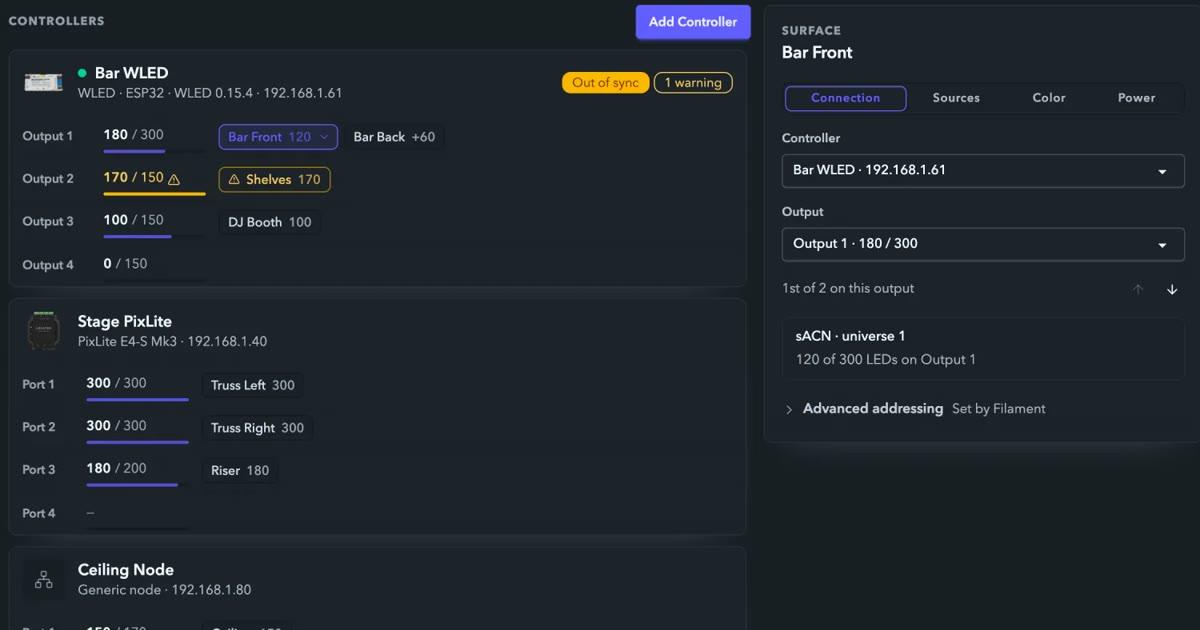
The Output page now starts from the hardware. Press Add Controller and Filament scans the network: WLEDs, Advatek controllers (factory-fresh PixLites included) and Art-Net nodes show up in the list. Choose yours, tick the outputs that have a strip, type how many LEDs are on each, and that's the whole form.
Every controller gets a card with its ports. Drag a Surface onto a port and Filament addresses the chain. Each port shows how much of it you've used, so an overfull port shows up on screen and not as a dark strip at the venue. The last step of the wizard is Identify: press Flash and the strip on that port blinks, so you know which one you just named "Door".
Still waiting for the board to arrive? Browse Catalog lists the controllers Filament knows by maker, Advatek, Gledopto, QuinLED and WLED, with a photo, the specs and links to the maker's docs. Add yours from there before it even has an IP address, draw the whole rig, and Filament checks it against the real board once it's on the network.
The universes are still in there, folded under Advanced addressing. You just don't have to open it.
WLED in one step
Add a WLED, assign curves to its outputs, and Set Up for Filament configures the board in one go, LED chip included. It lists every change before it writes anything, like Output 1 LED count 30 → 300, and Revert puts it all back. It never touches your pins, colour order or Wi-Fi. You need WLED 0.15 or newer.
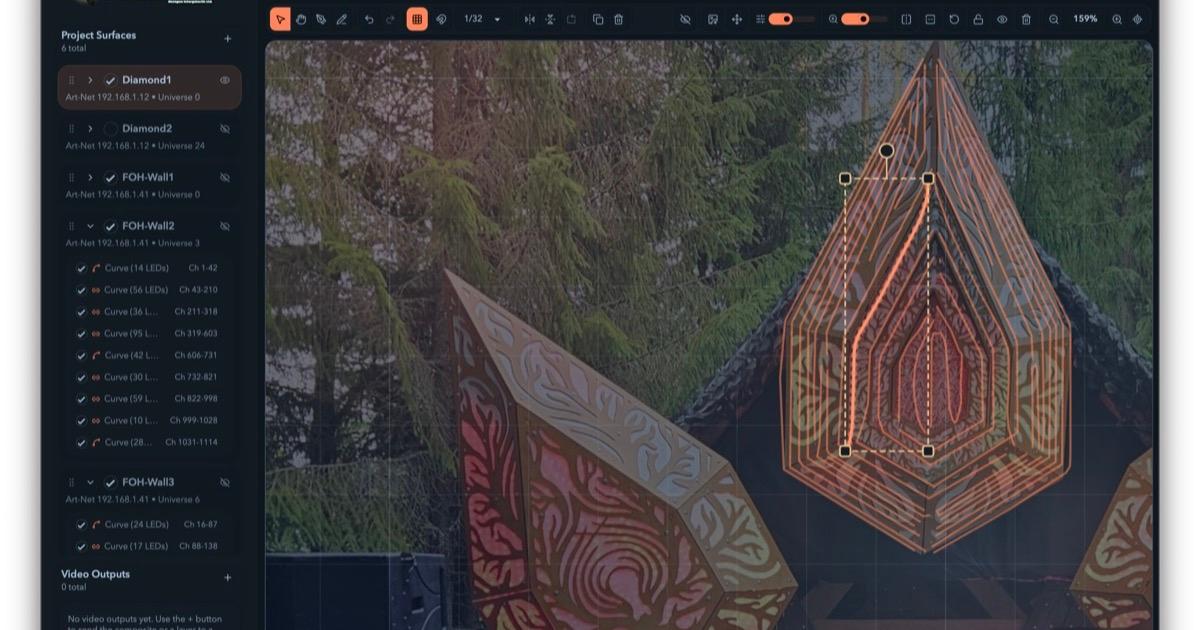
File → Export to WLED… goes the other way. It turns the LEDs on a Surface into a WLED LED map, so WLED's own 2D effects follow the shape you actually built. It's free in the trial. So even if you never play a show from Filament, you can draw your rig over a photo once and hand WLED the map.
PixLite Mk3 straight from the box
Filament finds a PixLite Mk3 straight out of the box, moves it onto your network and writes its LED chip and pixel counts. Timeline Export can also put a standalone show on its microSD card.
More kinds of pixels
RGBWW strips with a colour-matched warm and cool white split, RGBCCT outputs on WLED, and 5- and 6-channel pixels on generic controllers. The new Place Fixture tool (F) drops a matrix panel or a single LED from the library straight onto the canvas.
Tutorials that wait for you
The first launch now opens a welcome with guided paths: lighting up LEDs, projection mapping, the Player, and one for people coming from Resolume. Each tour explains the idea, then shrinks into a small panel while you do the real thing in the real interface, and moves on when you've done it. A tour only points. It never sends anything to your hardware.
And when the LEDs stay dark anyway, Run Checks goes looking for the reason.
Timecode
For shows that run on someone else's clock. The Arrangement now chases incoming Art-Net Timecode, MIDI Timecode or LTC. Press Chase TC, watch the lock indicator, and the video and audio follow the incoming clock's speed without jumping. Filament can also be the clock: it sends Art-Net Timecode, MTC and LTC from the Arrangement or from a free-running Session clock. Chase and the Session clock can be triggered from MIDI and OSC.
On top of that sit sections and setlists. Name parts of the Arrangement as sections, line them up in a setlist with timecode starts, and end each entry in a hold, black or a loop. A project can carry several setlists, so the Friday band and the Saturday band don't have to share one.
An AI agent can build the show with you
Off until you switch it on: Filament now has an MCP server, so Claude Code, Claude Desktop, Codex and other agents can build and run projects, from the canvas and fixtures to the clip grid, the Arrangement, automation and exports. Settings → AI Agents sets up each client with one click and shows a live feed of what the agent is doing. It still won't carry the trusses for you, sadly.
Smaller things
Output now comes before Canvas in the navigation: Cmd+2 opens Output, Cmd+3 the Canvas. Preview windows resize from any edge, can be pinned on top, and get a black, gray, white or checkerboard backdrop behind transparent pixels. The full list, fixes included, is on the releases page.
Try it
1.12 is on the download page now. Plug in your controller and see how far you get before you have to think about a universe. My bet is all the way to lit LEDs. No signup, no time limit.
release · hardware · wled