Licensing and Trial
Filament's five license states, the exact trial restrictions, the seat policy, and where your key lives.
Filament is one desktop app for everyone — there's no separate "pro" build. A fresh install runs in trial mode, and a valid license unlocks the same binary you already have.
The trial limits are enforced in Filament's Rust runtime, not the UI, so they apply to real DMX output — not just the preview. Patching the React layer doesn't remove them.
What the trial includes
The full editor: project workflow, fixtures, the Canvas, routing, and the Player all work, so you can evaluate Filament on your real rig. Three things are held back:
- Export is blocked. Every export path returns a license-required error instead of writing a file.
- Live output glitches every 20 seconds. The runtime injects a brief black/white disruption roughly every 20 seconds, before both the DMX send and the preview — so what you see matches what your fixtures get.
- Video output is watermarked. A trial mark is shown over every video destination.
Activating a valid license lifts all three: exports work, live output runs clean, and the watermark disappears. Nothing else changes — the feature set is identical in trial and paid mode.

The five license states
Filament is always in one of five states. The same state drives the toolbar badge and the badge on the Settings → License card, so these labels are what you'll see everywhere. This is the canonical table — the other licensing pages refer back to it.
| State | Badge label | Trial limits? | What it means |
|---|---|---|---|
| Valid license | Licensed | No — fully unlocked | Activated and confirmed by Filament's backend on the last online check. |
| Offline / last receipt | Licensed (offline-safe) | No — fully unlocked | A previously confirmed license in use while the backend is unreachable. Going offline alone never downgrades you. |
| Activation pending | Activation pending | Yes | Your key was saved (encrypted), but the first online activation hasn't succeeded yet. Filament keeps retrying. |
| Trial, invalidated | Trial (invalidated) | Yes | A saved license couldn't be confirmed online, so Filament returned this machine to trial mode. |
| Trial, no key | Trial | Yes | The default on a fresh install — no key entered. |
The two Licensed states are the only unlocked ones; the other three carry the trial restrictions above.


Managing your license
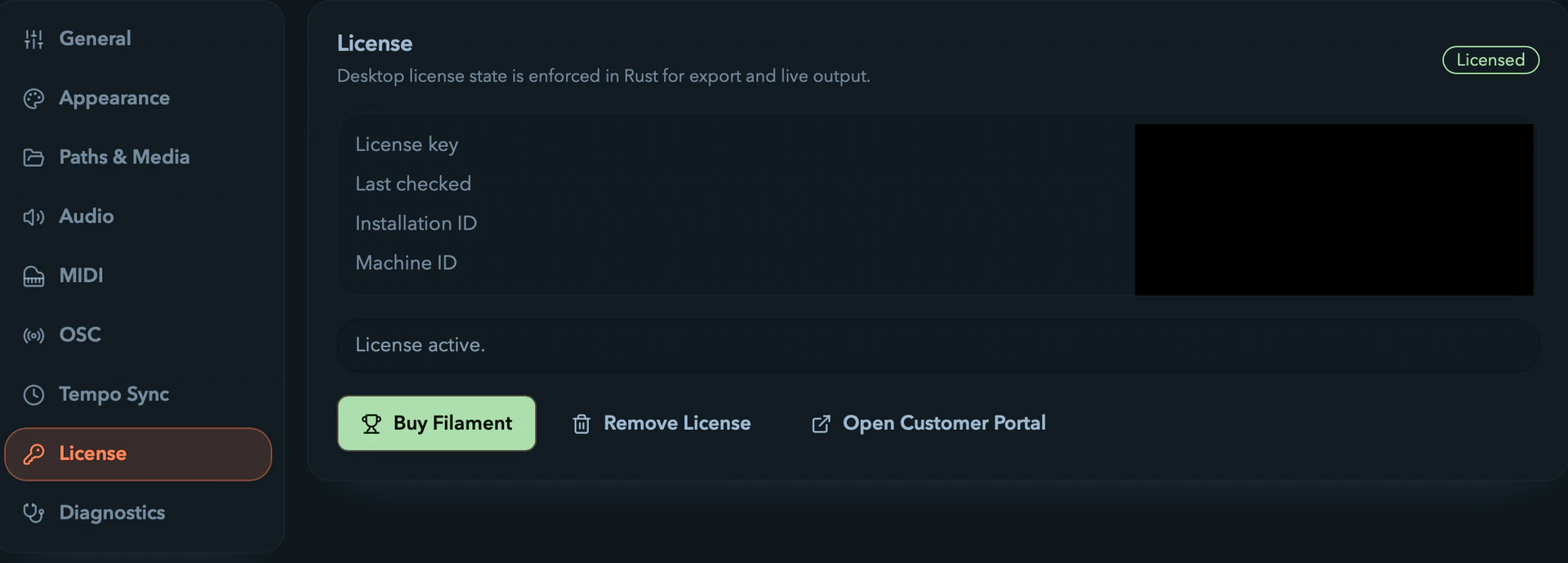
Everything lives on the Settings → License card: a state badge, your masked License key (or "No saved license key"), Last checked, your Installation ID, and your Machine ID (the hardware-bound identifier used for seat counting). Below that is a row of actions:
Buy Filament— opens the purchase pageActivate License— opens the activation dialog (readsChange Keyonce a key is saved)Re-check License— revalidates the saved license against the backend nowRemove License— removes the key from this installation (confirms first), returning you to trial. Your purchase and portal access aren't affected, so you can re-enter the same key later.Open Customer Portal— opens your portal (once Filament knows its URL)
When you already hold a valid license, only Buy Filament, Remove License, and Open Customer Portal show — there's nothing to activate or re-check.
To activate, choose Activate License (or Enter License Key on the home trial bar), paste your key, and hit Activate — Filament runs an online activation through its backend. See Activating a License for the full walkthrough.
Seat policy
A paid license can stay activated on up to two machines at once. Seats are counted against the hardware-bound machine ID, so each distinct machine uses one seat.
Replacing or losing a machine:
- Remove the license from the old install when you can (Settings → License →
Remove License). - Use the customer portal to recover your key and manage billing.
- Contact support if you need a seat freed.
Where your key lives
Filament stores your key locally and encrypted after a successful activation — that's what keeps the app unlocked offline. But your local copy is a convenience, not the source of truth. Polar, reached through your customer portal, stays canonical for your raw key, invoices, and billing history. If you lose your key, recover it there.
Next steps
- Download Filament from filament.click/download
- Activate the key you bought: see Activating a License