August 14, 2026 · Hexagon Intergalactic
A cheap & waterproof 12 amp WLED controller box
The parts list, the wiring, and the WLED settings for a pixel controller box.
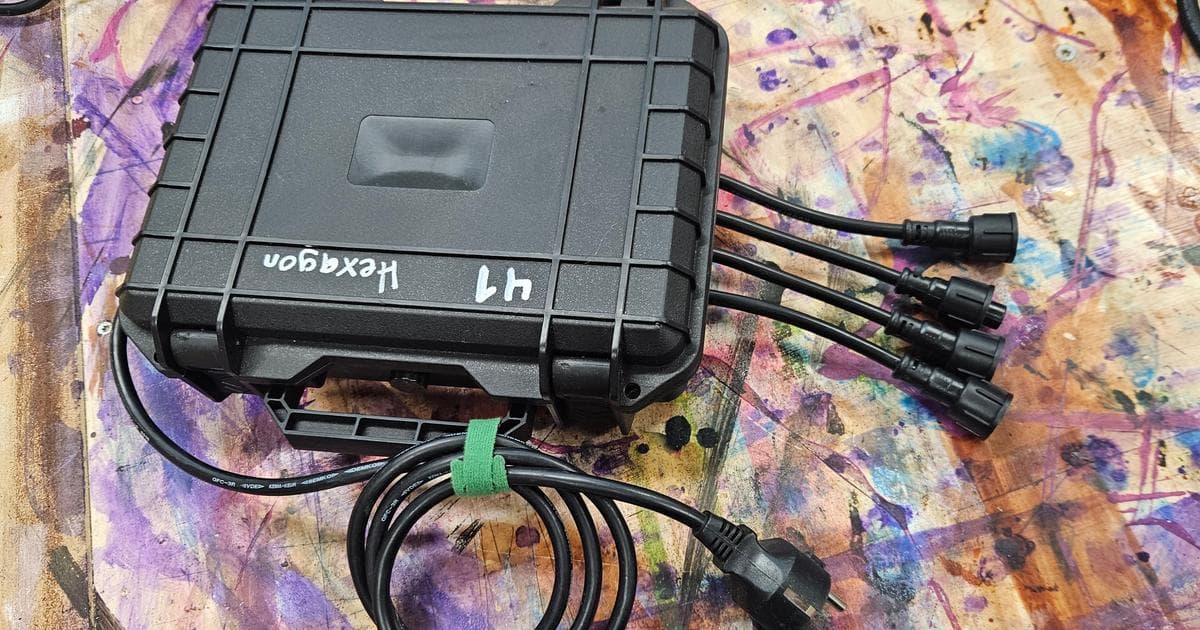
I built four new pixel controller boxes this spring, and they ran the FOH wall and all the environment strings at Spacetime @ Kosmos 2026. They're super clean, small, waterproof and easy to install - and the whole bill of materials is about 80€ per box.
The parts
| Part | Link | Price |
|---|---|---|
| AliExpress IP hard case | Aliexpress | 13€ |
| Gledopto Elite 4D-EXMU controller | Aliexpress | 25€ |
| Meanwell XLG-150-12-A power supply | Digikey | 28€ |
| Ethercon feedthrough (Rean RRE8F-Z-000-1) | Thomann | 5€ |
| xConnect & power wires, rubber gaskets, wagos | Aliexpress | 5€ |
Note: The links are not the best deals or affiliate links - they are just examples of which components I used in this project. You will likely find better deals by searching, as these links will get old and the prices will change.
Each box drives 4 outputs at 60 fps, 3 universes (or 510 LEDs) per output - the LEDs are plenty bright when the string gets power from both ends.
The 510 pixels per output describes the data configuration. Don't assume the 12 A supply can run all 4 × 510 RGB pixels at unrestricted full white. Work out the current draw for your pixels at the brightness limit you'll use. Size the wiring and connectors for that load, with suitable protection on each power branch. WLED's current limiter doesn't replace that protection.
The build
The build is super simple: Drill five eight millimeter holes in the box, one for the power on one side, four for the xConnect pigtails on the other. One larger hole for the Rean ethercon feedthrough. Screw in and glue the ethercon. Put the rubber gaskets in the drilled holes, stuff the pigtails through the gaskets. I use the thick, round Xconnect cables for my builds. I find these much more robust for gigs.
Connect everything with wagos: Each pigtail gets 12v and ground from the WLED power output and each data comes from the four WLED outputs. Here, I have red-black-yellow wiring, so data goes yellow.
Then the ethernet feedthrough. A simple, short 5e patch cable does the job well. It's actually an Ethercon port on the outside.
Finally, seal any possible failure places with hot glue. Just to make sure. Also, when you're fumbling under a desk trying to figure out which wire goes where, you wish you had written the output order clearly on the box. I like to set my boxes a static ip, so I also mark the last octet. Now that I think of it, I should up my Dymo game.
If you know of a better way to make the passthroughs for the power and xConnects, I'm all ears. I've done it this way because I prioritize stability and resistance to elements, and this is an idiot proof way to make them very water resistant. My stuff may need to be in rain for days, so reliability is a must.
The WLED settings that matter
There are five things that might be worth changing. These may differ on your install depending on your hardware, wled version, etc.
Give every box a static IP and label the box. This is the whole reason I moved to WLED in the first place - the addresses are mine to decide, not whatever the controller firmware feels like. Filament can find Art-Net nodes on the network and fill in the IP for you, but I still pin them by hand and label the boxes. I want box 4 to be box 4 at every gig, not whatever DHCP handed out during load-in while forty other things were being plugged in. Also, when the boxes have clear markings of their address, it's much easier to figure out which box and port is causing trouble when fumbling in the dark between the moltons on the stage.
Pick the right ethernet type. The ethernet port is the point of this build, and in WLED you have to tell it which board it's sitting on before that port does anything. Gledopto wleds have most of these pre-configured out of the box.
Art-Net, and count your universes. 510 LEDs on an output is 1530 channels, so that's three universes per output and twelve universes of pixels per box. At 60 fps, twelve universes means 720 packets a second leaving one box.
One numbering gotcha worth double-checking: Art-Net universes start at 0, sACN (E1.31) starts at 1. Filament and WLED both let you set the start universe, so just make sure they agree. An off-by-one there looks like a broken LED strip.
Four outputs, and the pinout is printed on the board. IO16, IO12, IO4 and IO2. Set each output to 510 and target FPS to 60.
Why 510 or 512
A DMX universe holds 512 channels, but an RGB pixel eats 3 of them. 512 ÷ 3 = 170.67, so if you fill the full 512, pixel #171 gets split across a universe boundary - its red channel lands at the end of one universe and green and blue at the start of the next. That's a recipe for color glitches and off-by-one headaches. 170 pixels × 3 channels = 510 fills the universe cleanly, and the last 2 channels just go unused.
So in WLED: 3 universes × 170 pixels = 510 LEDs per output. Make sure each output's start universe increments by 3 so nothing overlaps: outputs starting at universes 0, 3, 6 and 9.
The one exception is RGBW. Four channels per pixel divides 512 evenly (128 pixels × 4 = 512), so the math flips and full universes work fine there. For plain RGB seed pixels and regular WS2811/WS2812 strips, which is most people, most of the time, 510 it is.
Make it boot dark. Set the startup preset to plain black. WLED drops out of realtime mode a couple of seconds after the Art-Net stream stops and falls back to that preset, so losing the network means the artwork goes dark instead of a giant LED artwork deciding to show a full-brightness rainbow in the middle of somebody's set.
WS2811 Frame Rate vs. DMX Universes
The limiting factor is the WS2811 data transmission speed, 800 kbps. Each RGB pixel takes 30 µs to transmit, plus a ~300 µs latch time per frame.
A DMX universe holds 170 RGB pixels (510 DMX channels).
So the frame time is (Pixels × 30 µs) + 300 µs.
For 60 fps, a frame has to go out in 16.67 ms or less. Three universes (510 pixels) fit, four (680 pixels) don't.
| Universes | Pixels | Frame Time | Max FPS |
|---|---|---|---|
| 1 | 170 | 5.4 ms | ~185 FPS |
| 2 | 340 | 10.5 ms | ~95 FPS |
| 3 | 510 | 15.6 ms | ~64 FPS |
| 4 | 680 | 20.7 ms | ~48 FPS |
| 5 | 850 | 25.8 ms | ~39 FPS |
| 6 | 1020 | 30.9 ms | ~32 FPS |
So I limit each WS2811 output to 3 DMX universes (510 pixels) and get smooth 60 fps.
Other controllers
I have older, beefier controllers too - a 2U rack case with 12 fused XLR outs, 2 × 25 A Meanwells and a Club Lights 12 Pro from AliExpress, plus a couple of boxes with up to 16 A supplies and an H802RA for four outputs. Two of these rack versions ran the five crystals this year at Kosmos Festival and have done so for many other projects.
But the AliExpress boxes have fixed ideas about IP addresses, and when they lose data they just freeze. The WLEDs are completely flexible about their network config, and they can fail more gracefully by falling back to their own programs.
Connectors
xConnect, always. I love the large plugs. I've previously had many smaller and more fiddly connectors, but xConnect is stupid, simple and it works. I've stepped on these countless times and have yet to break one by accident. Sometimes there have been deformed plastic parts in orders, but it is still by far the best connector I've used for these. You might think the o-ring is not exactly required due to how tight they fit - don't fool yourself. It's essential for waterproofing, I've had strips freak out due to moisture in the connection, causing flickering and flashes of colors, making the problems very obvious.
We use seed pixels for many things. They are ip68, are easily glued into place and cheap. You can order them with the connectors so there's no soldering needed at all.
What's your setup like?
If you'd like to see what we do with all this hardware, the Kosmos Festival report follows the crystals, controller boxes and lights through a weekend in the forest. ITU takes the same crystals into a small gallery, with vines, a hanging sculpture and a soundtrack of its own.
And once your box is ready, download Filament and try mapping your lights. It's the software I use to turn these piles of plywood, cables and pixels into a show.
I'm very interested in how you have built your controllers! Come show your rig on our Discord.
hardware · wled · behind-the-scenes