August 21, 2026 · Hexagon Intergalactic
Make your LEDs listen
Kick, hats, vocals, or the whole spectrum - almost any knob in Filament can follow your live audio, with attack and release shaping.
Audio-reactive LEDs usually mean one of two things: a microphone effect that flickers at everything, or a pile of DSP settings that wants a weekend. What I wanted for my own rigs sits in the middle: pick a knob, tell it to follow the kick, shape how it moves, done.
That's how it works in Filament. Almost any numeric control can listen - an animation's speed, an effect's dry/wet, a blur radius, the master brightness. Click the control's modulation button, choose Audio reactive, and the fader grows two markers: the output range the sound sweeps between. A live dot bounces between them showing the exact value being applied, every frame. It's the same value your LEDs are getting.
The master bar carries a live input monitor of 32 bands. Pick the input device and enable reactivity once, in Settings → Audio. Both of those are per-machine settings. Reactivity is actually on by default - the part people miss is the input device, and until you pick one Filament captures nothing.
I've long carried with me to gigs a Focusrite Scarlett and a selection of cables for hooking up to the mixer outs.
Picking what it hears
The audio panel starts from presets named after what you actually want - Kick, Bass Pump, Snare / Clap, Hat Shimmer, Mid / Vocal, Smooth Swell, Balanced (Full). Nine times in ten you pick the one named after the thing you want to follow and move on. The tenth time, you drag two handles across a live mini-spectrum and carve the band yourself.
A fresh mapping seeds its output range to the parameter's full range, so the value sweeps the whole fader until you narrow it. Set the two markers first, then pick the band. Double-click a marker to type an exact value.
Then you shape the response, and this is where it stops looking like a VU meter:
- Gain boosts the band before shaping, on top of the master input gain. For a quiet source that never reaches the top of your range, this is the first knob.
- Threshold gates out the quiet stuff - this is what makes a parameter react to hits instead of to the whole mix. If your mapping is always somewhere in the middle and never at rest, raise it until the quiet parts read as silence.
- Punch shapes the curve - above 1 sharpens peaks and pushes the floor down. If the hits don't feel like hits, this is the knob.
- Attack and Release decide whether the light snaps or breathes. Both run from instant to a full second of smoothing.
- Invert flips the whole thing - sometimes the best move is lights that duck when the drop lands.
With Invert off, silence leaves the parameter at the bottom of its range - no twitching. And if the audio device disappears mid-show, the spectrum zeros and the parameter settles at its minimum with Invert off. Plug it back in and the mapping recovers on its own.
Two quality-of-life things I use constantly. Copy/paste modulation from the right-click menu: dial in one kick band exactly how you like it, then paste it onto five more parameters instead of rebuilding it five times. And Bypass: park a mapping without deleting it - the manual fader comes back, the band and shaping stay saved.
Trust it before the show
I'd check the input monitor first: if that spectrum isn't moving, nothing is being heard, whatever the rest of the UI suggests - go back to Settings → Audio and check the device. A red tint along the monitor's top edge means the input is coming in hot enough to clip. For the opposite problem, a source too quiet to move anything, the Gain pot sits right beside the monitor and scales every mapping's band energy at once.
Then the fader itself. With Invert off, the live dot should settle at the bottom when the input goes quiet. With Invert on, it rests at the top. If it keeps moving during quiet parts, raise Threshold until they read as silence.
When a project has grown a dozen mappings, the Connections tab (F6)
lists them all in one place, audio bands and envelopes and MIDI alike, and
flags any binding whose target you've since deleted.
When there's no band for it
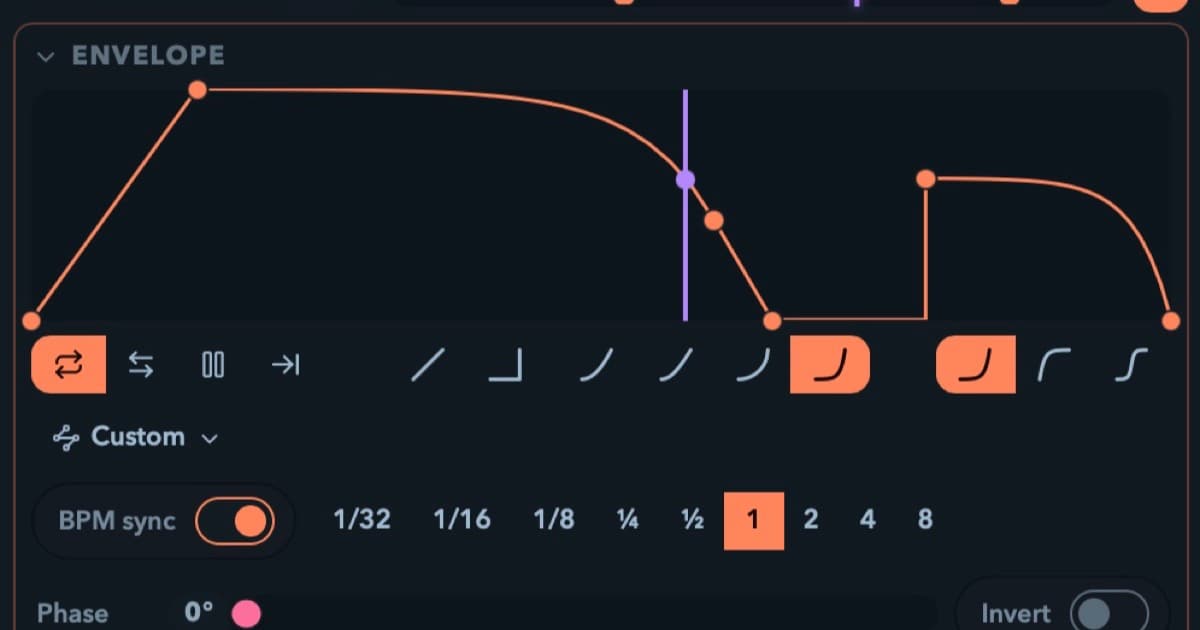
The same modulation slot takes an Envelope / LFO instead: start from a sine, saw, square, or triangle, then click to add points, drag them, and click a segment to cycle it between linear, smooth, and stepped. Sync the cycle to bars, from 1/8 of a beat up to 8 bars, or run it on a free clock from 50 milliseconds to a minute. There's a loop, a ping-pong, and a one-shot mode with a trigger button, so an envelope can be anything from a strobe to a slow eight-bar swell to a manually-fired sting.
BPM-synced envelopes follow the master tempo, the one that follows the DJ if you let it. Audio-reactive mappings follow the energy in the live input band.
The master knobs (Output, Speed, BPM) are modulation targets too. Their editors live in the Master modulation rack (the master bar has no room), and a master-brightness LFO can even free-run while the transport is stopped, so the room keeps breathing between sets.
Sound, clock, or hands
I can leave a parameter following the sound or a clock, or move it myself.
Audio reactivity lets a band of the live input drive a parameter. The mapping responds to the energy in that band.
Tempo sync uses one master tempo in the Player's Session view. Tap it, or hand it to Ableton Link, Pro DJ Link, or MIDI Clock, and BPM-locked video and envelopes follow that tempo. With MIDI Clock, send a transport Start or use Set downbeat to anchor the bar. Phase lock aligns the bar when the source provides phase. I wrote a whole piece on that: Lock your lights to the DJ.
MIDI control lets a physical fader move a parameter. Enable your controller under Settings → MIDI first. Then arm MIDI Learn in that same Connections tab, click the on-screen control and move the physical one. Click Stop MIDI Learn when you're done. Or right-click a single control and pick MIDI-learn this control. A learned fader takes the same one-per-parameter modulation slot as an audio band, so a knob follows the music or your hand, never both at once. Pads can launch a clip or fire Blackout. If you play live at all, put Stop all on a pad before your first gig. Learn it before the show so you know where to reach.
The mappings save with the project. Set up the audio device and input gain on each machine, check that reactivity is enabled, and enable its MIDI controllers. The tempo source starts on Internal after a relaunch. And the modulation doesn't care where the pixels end up: the same show can feed strips over Art-Net and a projector through video outputs at the same time.
Try it yourself. Full editor, no signup, no time limit: put a track on and map a band to your own strips. One heads-up while you're unlicensed: the trial interrupts live output for a moment about every 20 seconds, on the strips and in the preview alike. Video output also carries a watermark, and exports are blocked in the trial.
audio-reactive · tutorial