August 29, 2026 · Hexagon Intergalactic
Write your own effects in WGSL
A custom Filament effect is one WGSL file, written in a built-in editor with live preview - no build step, and a broken shader never takes the show down.
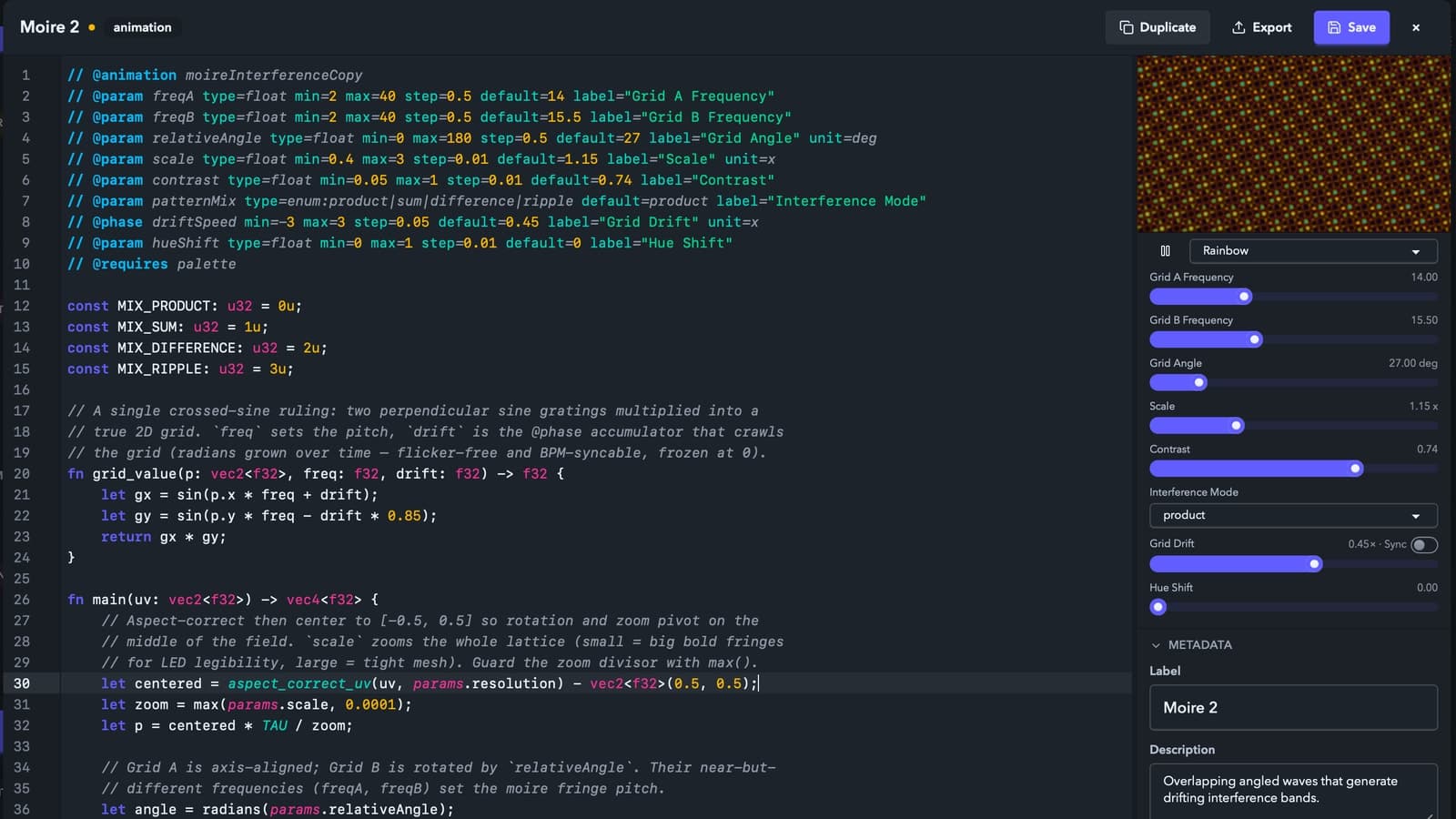
Sometimes the effect I need isn't in the list. In Filament I can write it in WGSL and see it on the video while I type. The show keeps the last saved version on the output until I hit save.
Start with a working effect
A custom effect is one effect.wgsl file. The @effect line names it. Each @param adds a control to the UI. The main function samples the incoming frame and returns a color. This is a complete working effect:
// @effect rgbShift
// @label "RGB Shift"
// @category glitch
// @param amount type=float min=0 max=0.1 default=0.01 label="Shift"

fn main(uv: vec2<f32>) -> vec4<f32> {
    let o = vec2<f32>(params.amount, 0.0);
    let src = fx_input(uv);
    return vec4<f32>(fx_input(uv + o).r, src.g, fx_input(uv - o).b, src.a);
}
fx_input(uv) is the frame coming down the chain - the clip, layer, or master output where the effect sits. The generated params struct holds the values from your @param lines. A float becomes a slider, a bool becomes a toggle, a color gets a swatch, and an enum gets a dropdown.
Each one works like any other Filament parameter. You can map it to MIDI with soft takeover, drive it from audio or an LFO, or keyframe it on the timeline. In this example, amount can follow the kick drum.
Motion without a time uniform
If you come from Shadertoy, the first thing you'll look for is time. It's not there. Multiplying wall-clock time by a speed knob makes motion jump every time the knob moves - the jump grows the bigger time gets, and on a dance floor that reads as a glitch you didn't write.
Instead the runtime hands you pre-integrated motion: params.phase is a smooth ever-growing phase, params.beat is a continuous beat count, and params.barPhase sweeps 0..1 across the bar. fract(params.beat) is your position inside the current beat, so
let hit = pow(1.0 - fract(params.beat), 4.0);produces a clean downbeat spike locked to the project tempo. If the rig is synced, it follows the DJ.
Edit and preview in Filament
Hit New in the Effects tab and pick a starter. The file opens in Filament's built-in editor with WGSL syntax highlighting and autocomplete for the prelude helpers and your own params fields. Errors point to your line numbers. A live preview beside the code updates while you type, and every @param is already a working control next to it.
Cmd+S writes the file and hot-swaps the effect everywhere it's used. Until then the show keeps playing the last saved version. If the shader stops compiling, the preview keeps the last working image and prints the error over it. An effect that's broken on disk renders passthrough and gets an error badge. I've edited effects during soundcheck with content playing through them.
If you'd rather use vim, or whatever you already live in, the file watcher treats an external editor exactly the same - save effect.wgsl and it's on screen for the next frame.
View source opens any built-in effect in the same editor. Duplicate to my library makes an editable copy. I usually start with an effect that's close to what I want and change it from there.
The New effect dialog can copy a complete authoring prompt for an AI tool. When something breaks, Copy AI fix prompt in the Problems pane copies your source and the compiler errors.
Multiple passes, feedback and palettes
Larger effects can add a few more directives:
- @pass lines declare ordered internal stages - how separable blurs work. A pass can run at reduced resolution (scale=0.5 costs a quarter of the pixels), which is the difference between a blur you can afford on the master and one you can't.
- @state declares textures that survive to the next frame - the basis for trails, feedback, and motion-persistence effects.
- @requires palette gives you fx_palette_sample(t) from the active palette. The effect updates when the user switches palettes.
There's also a small prelude of helpers you'll actually use - luma(), rgb_to_hsv() and back, plus a cheap hash for grain.
Effects run per pixel, per frame, on every surface. Keep loop bounds constant and watch the number of texture fetches. Guard your divisors too. A zero-length radius produces NaN across the whole surface, and NaN propagates down the chain.
Sharing
Export writes a .filament-effect file. Drag it onto another Filament install to add it to the library. Filament validates the effect, and the shader can't access files or the network. If its id matches an installed effect, the import stops instead of replacing anything.
Animations too
Generators fill a cell instead of filtering its input. They use a small manifest and export as a .filament-animation bundle. They open in the same editor. The screenshot above shows one of mine, a moire interference pattern, mid-edit.
Animations also have @phase. Add it to a rate control and the runtime gives you accumulated phase instead of the raw rate value. Turn the rate up or down and the motion changes without jumping. Zero freezes it, and the control can still follow the project tempo.
The docs cover the full format, including a compact reference card you can hand straight to an AI assistant. The trial is the full editor, no signup, no time limit, so the shader loop above costs nothing to try - play around with it.
custom-effects · wgsl · creative-coding