Custom Effects
Write your own Filament effects — the single-file effect.wgsl bundle format, the prelude and tempo contract, multi-pass and feedback, and live hot-reload.
An effect is a filter. It takes the image a clip, layer, group or the master output produced, and answers one question per pixel: given this input, what comes out? Effects covers the built-in catalog and how chains work; this page is about writing your own.
Effects are the easier of Filament's two shader formats. An animation is a whole folder — animation.wgsl, a manifest.json beside it, usually a thumbnail. An effect is one file: effect.wgsl, manifest optional. Both formats generate the plumbing for you, so neither one lets you declare your own Params struct.
Starting one from inside Filament
Open the library drawer and go to the Effects tab. Three buttons sit above the catalog: New, Open folder, and a book icon that opens this page.
Hit New. Give it a name — the dialog shows the folder id it derives, and picks a free one if that id is taken — then choose a starter under Start from:
Minimal colour— gain and tint over the incoming image. The smallest effect that does something.UV distort— tempo-locked wobble. Shows how to read the beat and displace coordinates.
Create writes a working bundle, adds it to your library, and opens it straight in the built-in editor.
The dialog also offers Copy AI prompt to the clipboard. That prompt carries the whole contract on this page plus the file it just created, so you can paste it into an assistant, say what you want, and paste the answer back over effect.wgsl.
The built-in editor
Every effect tile carries an actions button (⋮) on its right edge, and right-clicking the tile opens the same menu, as does Shift+F10 when the tile has keyboard focus. Below the chain targets, a user effect offers Edit, Duplicate, Copy AI prompt, Export…, Reveal in Finder / Explorer and Delete. A built-in offers View source, which opens it read-only, and Duplicate to my library, which forks it into an editable copy of your own — the fastest way to learn how these are made.
Arrow keys move focus across the tiles. Double-click or Enter adds the effect to the chain the selection points at — the selected clip's, else the selected group's, else the selected layer's, else the master chain.
The editor is a full code pane: WGSL syntax highlighting, autocomplete for the prelude helpers and your own params.<id> fields, and errors marked on your line numbers as you type, not the line numbers of the assembled module.
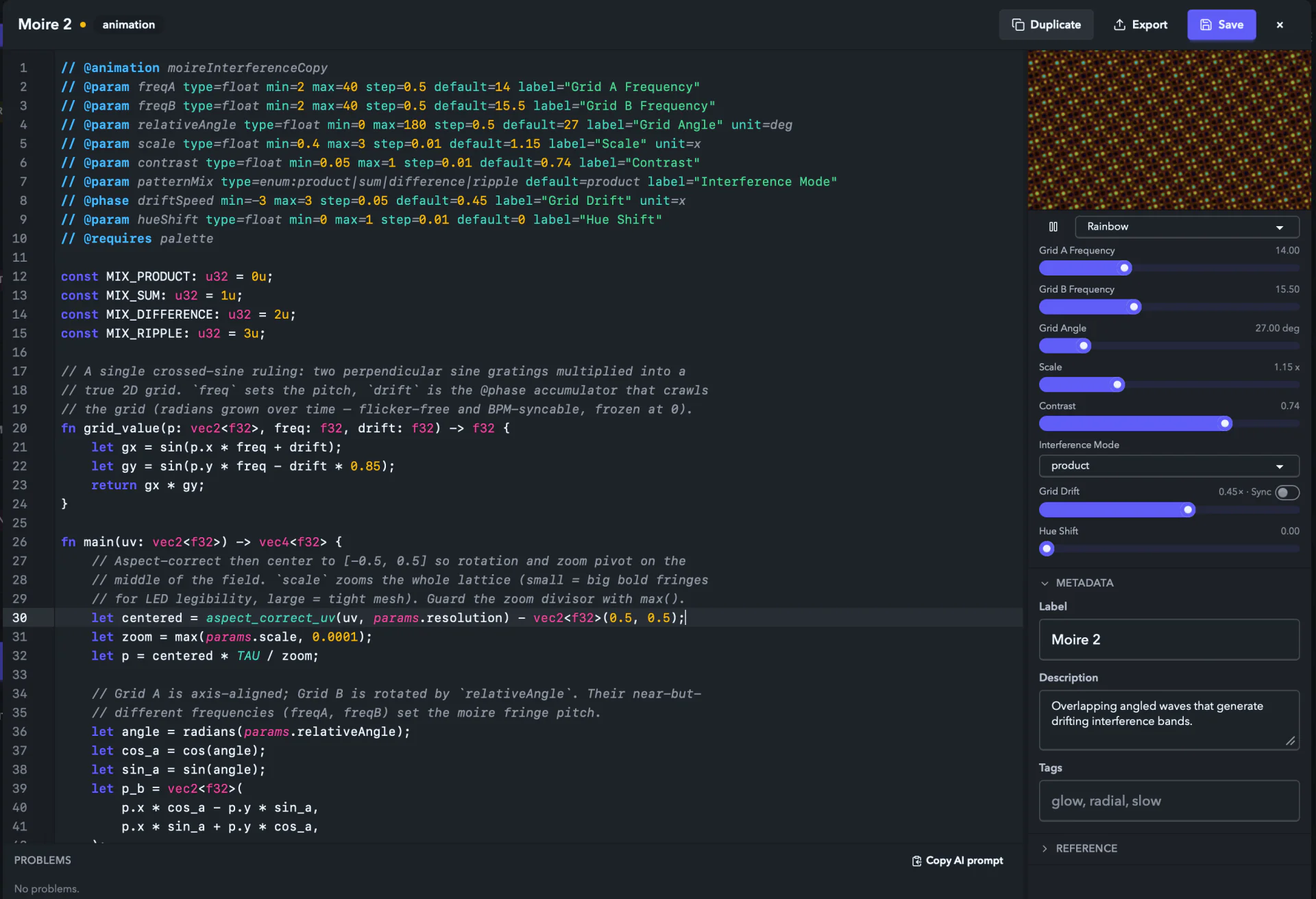
The right rail carries three sections:
- The preview — the buffer you're typing, run by the same GPU runtime that drives your output, over a
Test card,SolidorGradientinput, with knobs for every@paramand a palette picker when you@requires palette. A keystroke that breaks the shader keeps the last version that compiled on screen and prints the compile error over it, so an empty preview always says why it's empty. If the session itself can't start, the pane says so and offersRetry. Metadata— the label, description and tags written intomanifest.json, plus the category the header's@categoryset, shown read-only.Reference— the editor's shortcuts, the prelude helper list, and the whole authoring contract with a copy button next to it.
Under the code pane, Problems lists everything the validator found. Click a row to jump to it, F8 walks to the next one, and the pane's Copy AI prompt (Copy AI fix prompt once there are errors) packages the current buffer, its manifest and its errors in one paste.
Saving is deliberate: Cmd/Ctrl+S or the Save button writes to disk and hot-swaps the effect everywhere it's used. Until you save, the show keeps running the saved version, so you can mangle the buffer freely mid-set. Edit the same file in an external editor while the in-app one is open and Filament tells you, then lets you Load disk version or Keep mine. The file watcher treats both editors the same.
One thing the editor won't let you change is the @effect id: it names the bundle folder and every chain reference to it, so a save that renames it is rejected. Duplicate instead.
Installing a shared effect
Drag a .filament-effect archive anywhere onto the app window. Filament validates and installs it, and it appears in the User effects section of the Effects tab immediately. A rejected archive says why in an Effect import failed toast and nothing lands on disk.
For an unzipped bundle — a folder containing effect.wgsl — hit Open folder at the top of the Effects tab and drop the folder inside. The watcher picks it up without a restart.
To uninstall one, open its tile menu and choose Delete. That removes the folder from disk; it does not go to the Trash.
Where they live on disk
| Platform | Path |
|---|---|
| macOS | ~/Library/Application Support/Filament/effects/user/<id>/ |
| Windows | %LOCALAPPDATA%\Filament\effects\user\<id>\ |
| Linux | ~/.local/share/Filament/effects/user/<id>/ |
A bundle Filament has set aside sits in a sibling disabled/<id>/ folder with the reason written to compile-error.txt. The Effects tab lists those under a Disabled heading with the error text on screen. Hit the wrench to open the raw source in the editor — Save and restore puts a bundle that parses back in the library — or use the row's ⋮ menu for Fix in editor, Copy AI fix prompt, Copy error text, Open library folder and Delete. Fixing the file and moving the folder back up a level works too.
The shape of an effect bundle
myEffect/
  effect.wgsl        required — the header and the shader
  manifest.json      optional — sharing metadata (the editor writes one on save)
  thumbnail.png      optional
  LICENSE.txt        optional, max 16 KB
The header at the top of the WGSL carries the metadata, so a bare effect.wgsl is a complete bundle. The optional manifest.json exists so sharing tools can index a bundle with a plain JSON parser. Where the two overlap (label, category, description), the manifest wins and the header is the fallback. Two keys aren't metadata and must agree exactly with the header or the bundle is rejected: id (matches @effect) and usesPalette (matches @requires palette) — the second changes the compiled binding layout.
| Key | Notes |
|---|---|
schemaVersion | Required, always 1. |
id | Required. Must equal the @effect id. |
label | Plain text, max 80 chars. |
category | Id-shaped, max 32 chars. |
description | Max 1000 chars. |
version | Strict semver. |
author | Plain text, max 80 chars. |
usesPalette | Boolean. Must agree with @requires palette. |
license | Plain text, max 120 chars (e.g. "CC0-1.0"). |
tags | Up to 10 tags of max 24 chars. |
No samples/ — that's an animation concept. Anything else in a .filament-effect archive is rejected.
To share an effect, open its tile menu and hit Export… — Filament collects the bundle (writing a manifest if it never had one), verifies the archive re-imports through the real importer, and writes the .filament-effect file. Zipping the folder contents by hand and renaming to .filament-effect works too.
The header
The header is the first unbroken run of // @ comment lines and must start on line 1. The first line that isn't a // @ comment ends it, so never put another comment above or inside it. Any unrecognised // @ key is a hard error rather than a silent skip.
| Directive | Required | Notes |
|---|---|---|
@effect <id> | yes | Exactly one. Matches ^[a-z][a-zA-Z0-9]*$, max 64 chars. This is the folder name and the id the app stores in projects. |
@label "My Effect" | no | Display name, max 80 chars. Defaults to a title-cased id. |
@category <name> | no | Id-shaped, max 32 chars. Defaults to misc. Groups the built-in catalog in the browser; your own effects are listed together under User effects, and the category shows on the tile and matches the search box. |
@description "…" | no | One line, max 1000 chars, shown in the tile tooltip. |
@param … | no | One knob. Same grammar as animations — see below. |
@pass <name> | no | An ordered internal stage. Up to 8. |
@state <name> | no | A texture that survives to the next frame. Up to 2. |
@requires palette | no | At most one line. Binds the active palette. palette is the only recognised feature. |
Parameters
// @param <id> type=<float|int|bool|color|enum:a|b|c> default=<value> [min=<n> max=<n> step=<n>] [label="…"] [unit=<text>] [valueFormat=<fixed|percent|degrees|hertz|multiplier|integer>]Parameter ids match ^[a-z][a-zA-Z0-9]*$ and are unique within the file. float and int require min and max, with the default inside that range; int wants whole numbers for all three. color takes a hex default like default=#00ff88. enum lists its variants in the type and the default names one of them, not its index. bool, color and enum must not declare min, max or step at all.
| Type | Control the user sees | WGSL type |
|---|---|---|
float | slider | f32 |
int | stepper | i32 |
bool | toggle | u32 (0 / 1) |
color | swatch picker | vec3<f32> |
enum:a|b|c | dropdown | u32, the zero-based variant index |
unit is a short suffix on the readout (x, %, Hz, °); valueFormat overrides how the number is written when the unit doesn't imply it.
Every parameter is automatable: the Modulation system can drive any of them from audio, an envelope, or an LFO, the timeline can keyframe them, and MIDI can ride them. You get that for free by declaring the knob.
You don't declare a Params struct
The runtime generates the struct from your @param lines and binds it as params — just read params.<id>. Writing your own struct Params is rejected at parse time, the same as it is in an animation.
The same struct also carries the runtime's own values, always after your parameters and always in this order:
params.beat        // continuously growing beat count
params.barPhase    // 0..1 across the current four-beat bar
params.bpm
params.resolution  // vec2<f32>, the project render target in pixels
params.phase
params.fxMix       // the chain's dry/wet
There is no time uniform. Multiplying wall-clock time by a speed knob makes motion jump whenever the knob moves. Drive an effect from beat and barPhase and it stays locked to the project tempo, which is what you want on a dance floor anyway. fract(params.beat) is the position inside the current beat, so pow(1.0 - fract(params.beat), 4.0) is a clean downbeat spike. params.phase is the shared slot animations fill with their @phase accumulators; in an effect it free-runs in seconds and carries no tempo lock, so reach for beat.
fxMix is there because it's part of the struct, but the runtime already applies dry/wet for you — folding it into your own output would apply it twice.
Rate knobs
@phase is an animation directive; an effect header that uses it fails to parse. An effect's rate knob is a plain float @param multiplied into the beat count, which is how the built-ins do it — Trails' feedback spin, Transform's spin, Static's rate:
// @param spin type=float min=-2 max=2 default=0 label="Spin"

let angle = params.beat * params.spin * TAU;
Because beat grows with the tempo, the motion is tempo-locked for free, and rate 0 freezes it. Turning the knob mid-motion re-places the phase, so treat a rate as something you set or automate smoothly rather than snap.
Writing the shader
A single-pass effect is one function:
// @effect rgbShift
// @label "RGB Shift"
// @category glitch
// @param amount type=float min=0 max=0.1 default=0.01 label="Shift"

fn main(uv: vec2<f32>) -> vec4<f32> {
	let o = vec2<f32>(params.amount, 0.0);
	let src = fx_input(uv);
	return vec4<f32>(fx_input(uv + o).r, src.g, fx_input(uv - o).b, src.a);
}
uv runs 0..1 across the frame. fx_input(uv) samples what the effect is applied to — the chain input, or the previous effect's output. There's no vertex stage to write: the prelude supplies vs_main and the runtime wraps your function in the fragment entry point.
Alpha is straight, not premultiplied. Pass fx_input(uv).a through unless you mean to change coverage; the alpha-aware compositor honours what you return, so lowering it reveals the layers underneath. Colour is linear RGB and the chain runs at rgba16float.
The prelude
Concatenated ahead of your source, so don't define these yourself:
| Helper | What it does |
|---|---|
fx_input(uv) | vec4 sample of the chain input, or of the previous pass's output. Clamps uv. |
fx_input_size() | Dimensions of what fx_input samples, in pixels, as floats. |
fx_texel(uv_step) | Convert a pixel step into a uv step. |
rgb_to_hsv(c) | Linear RGB to HSV. |
hsv_to_rgb(c) | HSV to linear RGB. |
luma(c) | Rec.709 luminance. |
fx_hash12(p) | Cheap sine-free hash, for grain and jitter. |
Plus const TAU: f32, the VertexOut type, and the fx_sampler the state textures below are read through.
Using the palette
Add // @requires palette and the runtime binds the palette active where the effect runs, plus fx_palette_sample(t) -> vec4<f32>, a clamped 0..1 index into the user's colours. Map your input's luma to t and the effect re-tints itself the moment the user switches palettes — exactly how the built-in Recolour works.
// @effect myRecolour
// @label "My Recolour"
// @category color
// @requires palette
// @param amount type=float min=0 max=1 default=1 label="Amount"

fn main(uv: vec2<f32>) -> vec4<f32> {
	let src = fx_input(uv);
	let mapped = fx_palette_sample(luma(src.rgb)).rgb;
	return vec4<f32>(mix(src.rgb, mapped, params.amount), src.a);
}
Multiple passes
Declare @pass lines and write one fn pass_<name>(uv: vec2<f32>) -> vec4<f32> per pass. They run in declaration order and each samples the previous pass's output through fx_input. This is how separable blurs work: blur horizontally at reduced resolution, then vertically.
// @effect softBlur
// @label "Soft Blur"
// @category blur
// @pass horizontal scale=0.5
// @pass vertical
// @param radius type=float min=0 max=8 default=3 label="Radius"

fn pass_horizontal(uv: vec2<f32>) -> vec4<f32> { … }
fn pass_vertical(uv: vec2<f32>) -> vec4<f32> { … }
scale is a fraction of the chain input resolution in (0, 1] — always of the chain input, never of the previous pass — so a half-scale pass costs a quarter of the pixels. format picks the intermediate target (rgba8unorm, rgba16float, rgba32float) and defaults to the chain's rgba16float.
The last pass's target is the effect's output, and it goes on down the chain at whatever size and format that pass declared. Scale the intermediate stages and leave the final one alone.
Filament folds dry/wet into an effect's own shader when it can, which saves reading and writing a full extra target — the single biggest win in the effect catalog. That needs one pass, at full scale, in the chain format, with no @state, so an effect that adds a second pass, scales its pass down or keeps history pays for a separate mix pass on top of its own work. Prefer one pass unless you genuinely need the stages.
Feedback and trails
A @state texture survives to the next frame and binds as state_<name>: texture_2d<f32>. That's the basis for trails, feedback and motion-persistence effects. Two per effect, at most.
At the end of every frame the runtime copies the effect's finished output into each @state texture, so what you sample is the previous frame's result. Both textures receive that same image, so declare a second one only when you want the history at a second format. Read one through the shared sampler:
// @effect myTrails
// @label "My Trails"
// @category time
// @state history format=rgba16float
// @param retention type=float min=0 max=0.96 default=0.8 label="Trails"

fn main(uv: vec2<f32>) -> vec4<f32> {
	let current = fx_input(uv).rgb;
	let history = textureSample(state_history, fx_sampler, uv).rgb;
	return vec4<f32>(max(current, history * params.retention), 1.0);
}
format defaults to rgba16float, which is what feedback wants — an rgba8unorm history quantises the decay and banding compounds frame over frame. State textures are sized to the effect's output resolution and sampled with normalized uv, so a scaled final pass still lines up. They start black, and they're cleared again whenever the effect instance is switched off and back on, so a re-trigger restarts the trail instead of resuming a stale one.
Hot reload
The watcher notices any change under the user effects directory. Save effect.wgsl and the next frame uses the new source. Save manifest.json alone and the labels update with no recompile.
Failures never take the show down:
- The header or manifest stops parsing. The tile keeps the last version that loaded and badges itself
Broken on disk — running the last good version, with the parse error in anEffect errortoast and in the tile'sCopy AI fix prompt. - The WGSL doesn't compile. The effect renders passthrough and every row using it in a chain editor gets a red
failedbadge; expand the row for the compiler's message.
Performance
Effects run per pixel, per frame, on every surface. Filament is live-performance software, so treat a dropped frame as a bug in your shader:
- No unbounded loops, and no loop whose bound comes from a parameter — a dynamic bound stops the compiler unrolling and costs far more than the same work with a constant bound. Write a fixed bound with an early
breakwhen you need a variable tap count. - Texture fetches dominate. A blur that takes 33 taps costs roughly 33 times a simple colour tweak; use
scaleon a@passto do the expensive part at lower resolution. - Guard every divisor. A zero-length radius produces NaN across the whole surface, and NaN propagates through the rest of the chain.
Limits
effect.wgslmax 256 KB,manifest.jsonmax 64 KB,thumbnail.pngmax 1 MB and 1024×576,LICENSE.txtmax 16 KB- Archive: allowed entries only, no directory entries, no path traversal, no symlinks, max 32 entries, max 5 MB total, max 100:1 compression ratio
- Max 8
@pass, max 2@state,@effectid max 64 chars,@categorymax 32 chars,@labelmax 80 chars,@descriptionmax 1000 chars - No
#include, no imports, no network, no file access, no bindings you didn't declare through@pass/@state
An effect id that collides with a built-in or an already-installed effect is rejected rather than silently replacing it.
Reference card for AI agents and frameworks
A compact spec for tools generating effect bundles programmatically. Everything here is also covered above in prose.
Bundle requirements
- One required file:
effect.wgsl. Optionalmanifest.json(sharing metadata; wins over the header's@label/@category/@description),thumbnail.png,LICENSE.txt. Nosamples/. - Directory name must equal the
@effectid, and so mustmanifest.json'sidwhen present.manifest.json'susesPalettemust equal@requires palette.
Header grammar
// @effect      <id>                        exactly 1, ^[a-z][a-zA-Z0-9]*$, ≤64
// @label       "<text>"                    0..1, ≤80 chars, defaults to title-cased id
// @category    <name>                      0..1, ^[a-z][a-zA-Z0-9]*$, ≤32, defaults to "misc"
// @description "<text>"                    0..1, ≤1000 chars
// @param       <id> type=<type> default=<v> [min=<n>] [max=<n>] [step=<n>] [label="<text>"] [unit=<text>] [valueFormat=<vf>]
// @pass        <name> [scale=<0..1>] [format=<fmt>]      0..8, ordered
// @state       <name> [format=<fmt>]                     0..2, format defaults to rgba16float
// @requires    palette                     0..1, "palette" is the only feature
<type> ∈ float | int | bool | color | enum:<tag>|<tag>...
<fmt> ∈ rgba8unorm | rgba16float | rgba32float
<vf> ∈ fixed | percent | degrees | hertz | multiplier | integer- Header = first contiguous run of
// @lines, starting at line 1. First non-// @line ends it. - Unrecognised keys are errors. There is no
@phasein an effect header; a rate knob is afloat@parammultiplied intoparams.beat. float/intrequireminandmaxand a default inside them;intwants whole numbers.bool/color/enummust not declaremin/max/step.colordefault is#rrggbb. Anenumdefault names a variant. Parameter ids are^[a-z][a-zA-Z0-9]*$and unique.
Generated bindings
The runtime emits these ahead of your source; the bundle declares none of them.
struct Params { /* your @params, then beat, barPhase, bpm, resolution, phase, fxMix */ }
@group(0) @binding(0) var<uniform> params: Params;
@group(0) @binding(1) var fx_input_tex: texture_2d<f32>;   // prelude
@group(0) @binding(2) var fx_sampler: sampler;             // prelude
@group(0) @binding(3) var fx_palette: texture_1d<f32>;     // only with @requires palette
// @state textures follow in declaration order, as `state_<name>: texture_2d<f32>`:
// bindings 3, 4 without a palette; 4, 5 with one.
Type mapping: float→f32, int→i32, bool→u32, enum→u32 (zero-based index), color→vec3<f32>.
There is no time field. Motion comes from beat / barPhase. phase free-runs in seconds and is not tempo-locked in an effect. fxMix is applied by the runtime — do not blend with it.
Entry points
- No
@pass: definefn main(uv: vec2<f32>) -> vec4<f32>. - With
@pass: definefn pass_<name>(uv: vec2<f32>) -> vec4<f32>for each, run in declaration order.fx_inputreads the previous pass; the last pass's target is the effect's output. - Never define a vertex stage, a
@fragmententry,fs_mainorfs_pass_<name>; the prelude and the runtime supply all of them. - Straight (non-premultiplied) alpha, linear RGB,
rgba16floatchain format.
Prelude
fx_input(uv), fx_input_size(), fx_texel(uv_step), rgb_to_hsv(c), hsv_to_rgb(c), luma(c), fx_hash12(p), const TAU: f32, and fx_palette_sample(t) -> vec4<f32> when @requires palette is set. Sample a @state texture with textureSample(state_<name>, fx_sampler, uv).
Failure modes
| Condition | Result |
|---|---|
Missing effect.wgsl | Import rejected |
Unknown // @ key, bad id, missing min/max | Import rejected with the header error |
Bundle declares struct Params, struct VertexOut, a @group(...) binding, a vertex stage or a fragment wrapper | Import rejected, naming the rule |
manifest.json id or usesPalette disagrees with the header | Import rejected |
| Id collides with a built-in or installed effect | Import rejected; no silent replace |
| Disallowed archive entry, traversal, symlink, size or ratio limit | Import rejected |
| Header stops parsing on a hot reload | Tile keeps the last good version and badges the error |
| WGSL fails to compile | Effect renders passthrough, chain row badged failed with the error |
Filesystem locations
- macOS:
~/Library/Application Support/Filament/effects/user/<id>/ - Windows:
%LOCALAPPDATA%\Filament\effects\user\<id>\ - Linux:
~/.local/share/Filament/effects/user/<id>/
Minimal valid bundle
effect.wgsl:
// @effect myGain
// @label "My Gain"
// @category color
// @param gain type=float min=0 max=4 step=0.01 default=1 label="Gain"

fn main(uv: vec2<f32>) -> vec4<f32> {
	let src = fx_input(uv);
	return vec4<f32>(src.rgb * params.gain, src.a);
}
That file, in a folder called myGain, installs and runs. Use it as a starting point for any generated effect.
Effects
Drop GPU effects onto a clip, a layer, or the master output, chain them, recall presets, and ride their parameters live — blur, glitch, color, trails, and your own shaders.
Modulation — Audio & Envelopes
Turn any numeric control into a live-driven one — make parameters react to sound with a draggable bandpass band, or draw beat-synced envelopes and LFOs that ride a parameter on their own.