 Filament Docs
PixLite
Set up Advatek PixLite Mk3 controllers from the box, keep their port tables in step with Filament, and export standalone shows to their microSD card.
Advatek's PixLite Mk3 controllers are first-class in Filament. Filament finds a unit straight from the box, moves it onto your network, writes its LED chip and pixel counts, and bakes standalone shows that play from the controller's own microSD card.
Requirements: a PixLite Mk3 controller with API v1.5 or later (firmware 3.3.0 or later recommended). The A4-S, E4-S, E16-S, T8-S and T16X-S are in the catalog.
A PixLite straight from the box
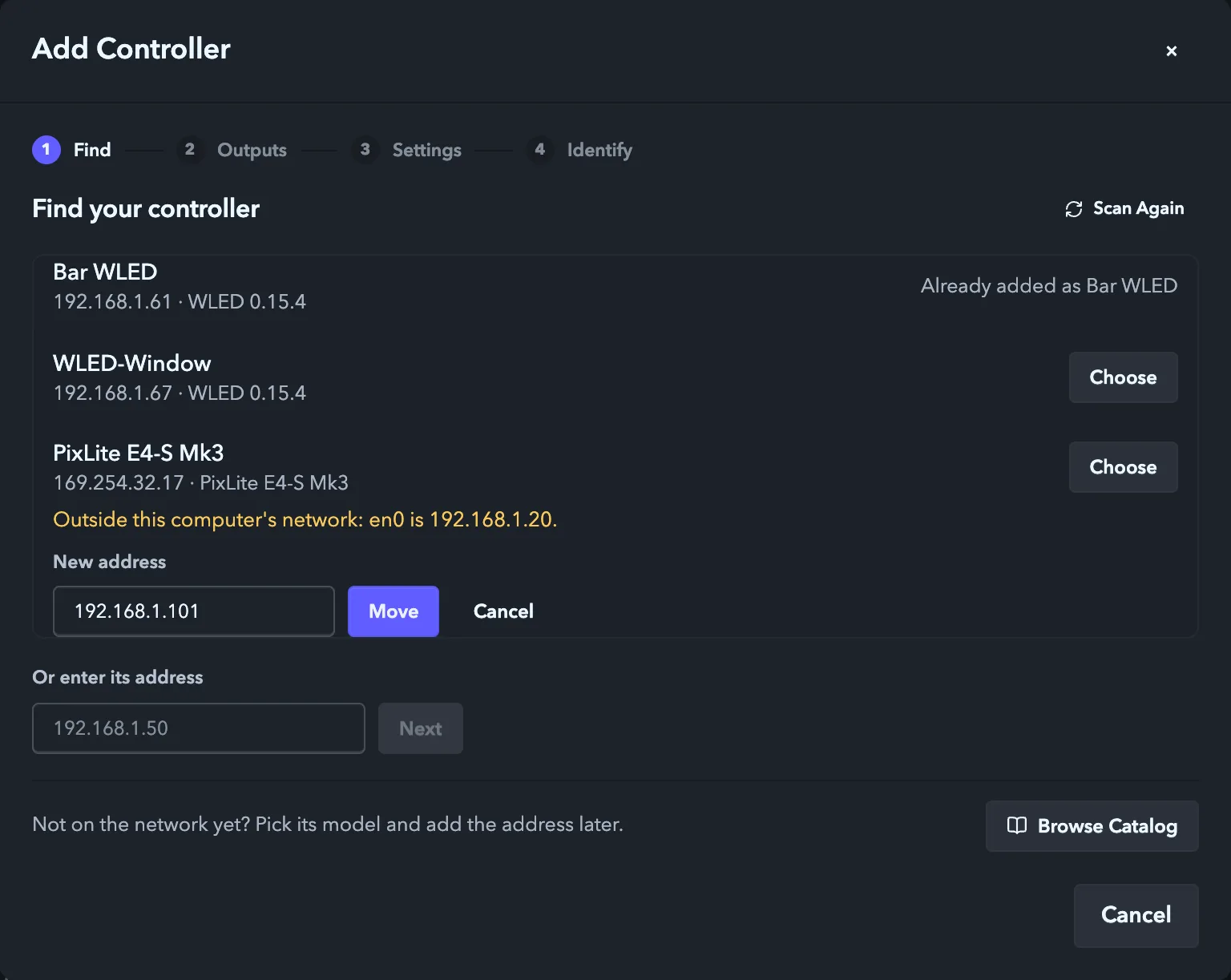
A PixLite fresh from the box listens for sACN and, with no DHCP server on the network, picks its own 169.254.x.x address. Filament finds it anyway: every scan in the Add Controller wizard also runs Advatek's own discovery on every network interface.
When the unit isn't on your computer's network, its row says Outside this computer's network: en0 is 192.168.1.20. and offers Change Address:
- Filament suggests a free address on that network. Change it if you like.
- Move gives the controller that static address and saves it.
- Filament waits for it to answer at the new address, reads it and opens its outputs.
A controller with an admin password, or in recovery mode, has to be readdressed in Advatek Assistant.
Adding a PixLite
Choose reads the controller's ports. If the controller has an admin password, Filament asks for it once and keeps it in memory until it quits.
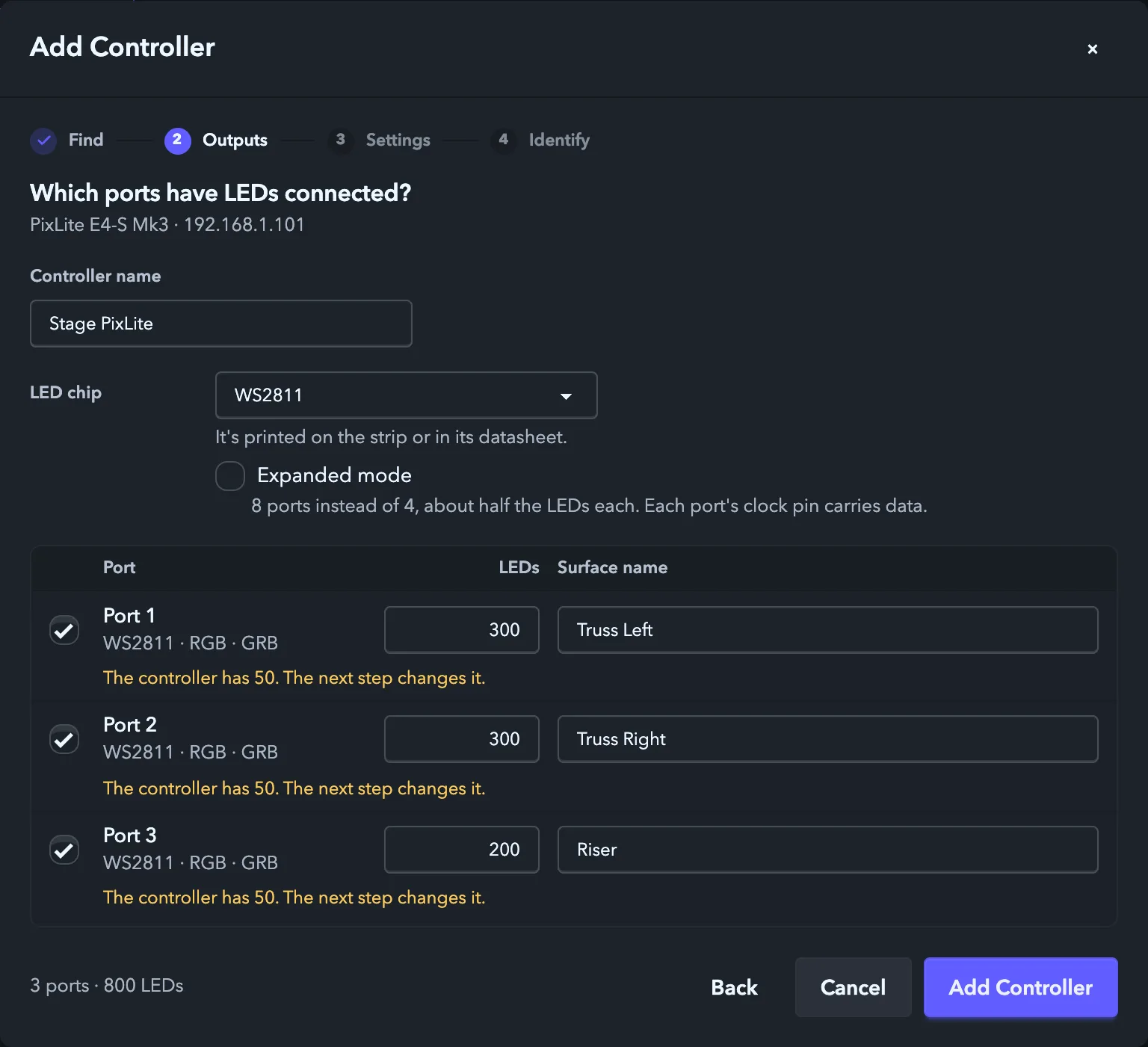
LED chip and expanded mode
The Outputs step starts with:
- LED chip — the pixel IC on your strips (WS2811, SK6812, APA102…). It's printed on the strip or in its datasheet. The chip decides the colour types on offer and the most LEDs a port can drive, typically 1,020 RGB. Under the choice Filament shows what tells the chip apart, for example RGB or RGBW · 8-bit · one data wire. A PixLite on the network lists the chips its firmware drives. One added from the catalog lists every chip in Filament's catalogue, over 90 of them, until it is first read.
- Expanded mode — doubles the ports: each port's clock pin carries a second data line, with about half the LEDs each (an E4-S runs 8 ports of up to 510 RGB). Not available for chips that need their clock pin, such as APA102.
Then tick the ports with strips, set their LED counts and name the Surfaces. Ports that are off on the controller start unticked. A count that differs from the controller's reads The controller has 50. The next step changes it.
Writing pixel settings
The wizard's Settings step — and Set Up in the controller's LEDs per port — writes the pixel settings your Surfaces need:
- Colour type (RGB, RGBW or RGBWX, when the chip has more than one) and Colour order.
- Filament will change lists every difference against the controller, such as Port 3 · Pixels 50 → 200. Addressing changes fold behind Network input.
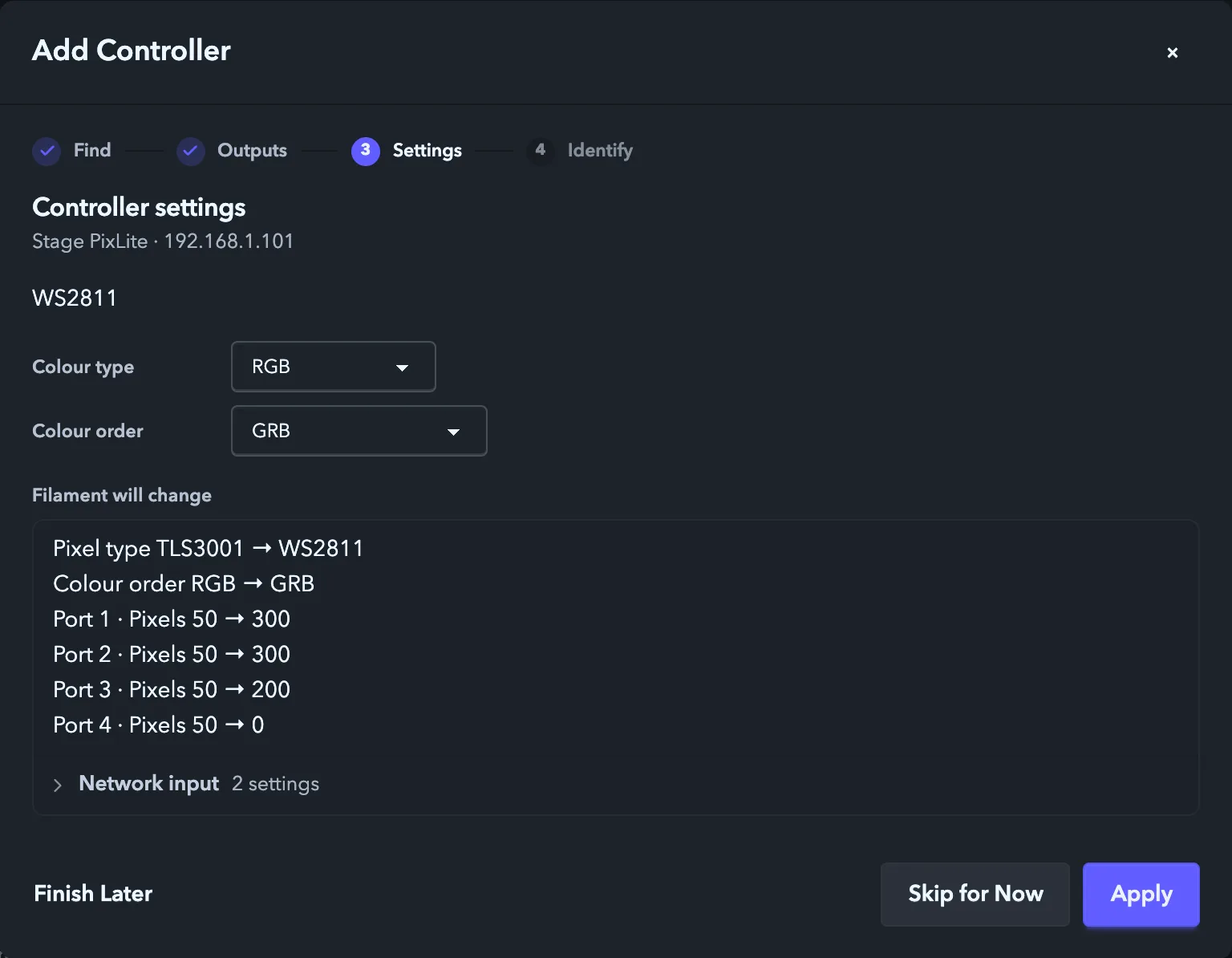
Apply writes them safely:
- Filament saves a backup of the controller's settings.
- It applies the new settings and reads them back.
- Only when the read-back matches does it save them on the controller; otherwise it reverts, and nothing changes.
Saved on the controller. confirms it. Restore Previous Settings puts the backup back.
If the connection drops before the controller confirms the save, Filament can't tell how much of the setup it kept. Restore Previous Settings then appears under the warning and puts the backup back.
What Filament writes: the LED chip, colour type and order, the pixels on each port (unticked ports are set to 0), the port addressing, and the chip's frequency and input format. Existing universes and channels are kept when the new counts still fit; otherwise every used port is renumbered, each starting on a new universe.
What stays in Advatek's tools: network settings (apart from the out-of-box move), passwords, the aux port, triggers, gamma and intensity, firmware updates, and a data source set to DMX input.
The PixLite inspector
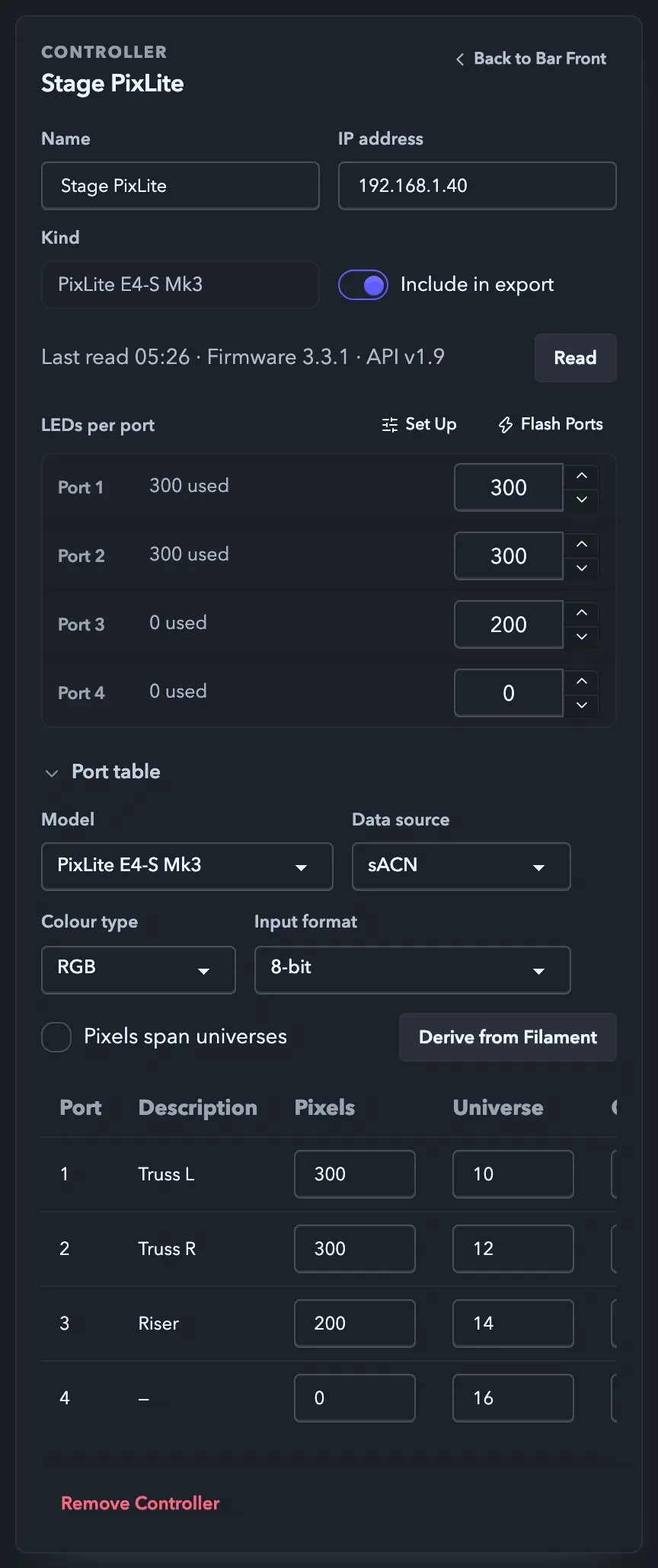
Click the PixLite's card to see:
- Include in export. Switch it off to leave the controller out of microSD exports; its Surfaces keep sending live.
- Last read, with the firmware and API version, and Read.
- LEDs per port, with Set Up and Flash Ports.
- Port table — the table Filament addresses Surfaces and bakes shows against.
- Any issues with the controller, and Remove Controller.
Reading the controller
Read compares the controller with Filament's port table. When they match, it says so. When they differ, Port Table Differs lists every setting side by side, and you choose Use Controller's Ports or Keep Filament's.
The port table
The Port table holds the Model, Data source (Art-Net or sACN), Colour type, Input format, Pixels span universes, and per port the pixels, universe, start channel, null pixels and grouping, with which Surface each port reads. Edits here change Filament's table only; Set Up writes them to the controller.
In an Art-Net table, PixLite numbers universes from 1: Art-Net universe 0 in Filament is PixLite universe 1.
Derive from Filament builds the table from your hand-addressed Surfaces, for controllers whose Surfaces aren't on ports.
The aux DMX port
When the controller's aux port is set to DMX512 out on the same protocol as its pixels, it appears as a port named Aux 1. You can put a Surface on it, flash it, and export to it. It holds one universe (170 RGB pixels) and can't grow. Set the aux port up in Advatek's tools; Filament only reads it.
Standalone shows on the microSD card
A PixLite Mk3 can play a show from its own microSD card, with no computer attached. Compose the show on the Timeline, then use the PixLite tab of the Export dialog to bake one scene file per controller, and copy it to the card or upload it over the network. See Capture & Export.
Troubleshooting
| Message | What to do |
|---|---|
| The controller runs API v1.4 …; Filament needs v1.5 or later. | Update the controller's firmware. |
| The device at this address isn't a PixLite Mk3. | Older PixLites work as generic Art-Net or sACN controllers. |
| The controller refused that password. | Enter the admin password set in Advatek Assistant. |
| The controller has a password. Change its address in Advatek Assistant. | Readdress it there, then scan again. |
| The controller takes pixel data from its DMX input. | Change its data source to Art-Net or sACN in Advatek Assistant. |
| Port 2 has 1200 LEDs; this chip drives up to 1020. | Lower the count, or split the strip over two ports. |