Custom Animations
Install community animations or write your own — Filament's .filament-animation bundle format, the WGSL phase-and-beat runtime contract, and live hot-reload.
Filament ships with a built-in animation catalog, and it's built so you can write a new one, drop it into the app, and have it sit right next to the built-ins.
The first few sections need no programming — installing a shared animation is drag-and-drop, and starting your own is one button. The later sections get technical for writing shaders by hand, and the very last one is a compact reference you can hand an AI assistant to generate an animation for you.
Starting one from inside Filament
Open the library drawer, go to the User animations tab (F3), and hit New. Give it a name, pick a starter template — Minimal is one brightness knob over the palette, Palette pulse is beat-reactive rings — and Filament writes a working bundle, adds it to your library, and opens it straight in the built-in editor. Save and the change appears immediately — no restart, no reimport.
The dialog also offers to put an AI prompt on your clipboard. That prompt carries the whole authoring contract below plus the files it just created, so you can paste it into an assistant, say what you want, and paste the answer back over the source. Every user animation carries the same Copy AI prompt action for changing one you already have, and when the file on disk stops compiling it reads Copy AI fix prompt — the error, the source, the manifest and the rules, in one paste.
The tile menu
Every tile in the library has an actions button (the ⋮ on its right edge); right-clicking the tile opens the same menu, as does Shift+F10 when the tile has keyboard focus. On one of your own animations it offers:
| Action | What it does |
|---|---|
Add to selected cell | Loads the animation into the selected cell. Double-click or Enter does the same. |
Edit | Opens the bundle in the built-in editor. |
Duplicate | Forks it into a new bundle called <label> Copy and opens that. |
Copy AI prompt | Contract + source + manifest on the clipboard. Reads Copy AI fix prompt when the saved file is broken. |
Export… | Writes a shareable .filament-animation file. |
Reveal in Finder / Explorer | Shows the bundle's folder in your file browser. |
Delete | Removes the bundle directory. It asks first, and it does not go to the Trash. |
Built-in animations live in the Animations tab (F2) and offer View source and Duplicate to my library instead.
The built-in editor
Hit Edit on any user animation. You get a full code editor in the app: WGSL syntax highlighting, autocomplete for the header directives, the prelude helpers and your own params.<id> fields, and errors marked on your line numbers as you type — not the line numbers of some invisible assembled module.
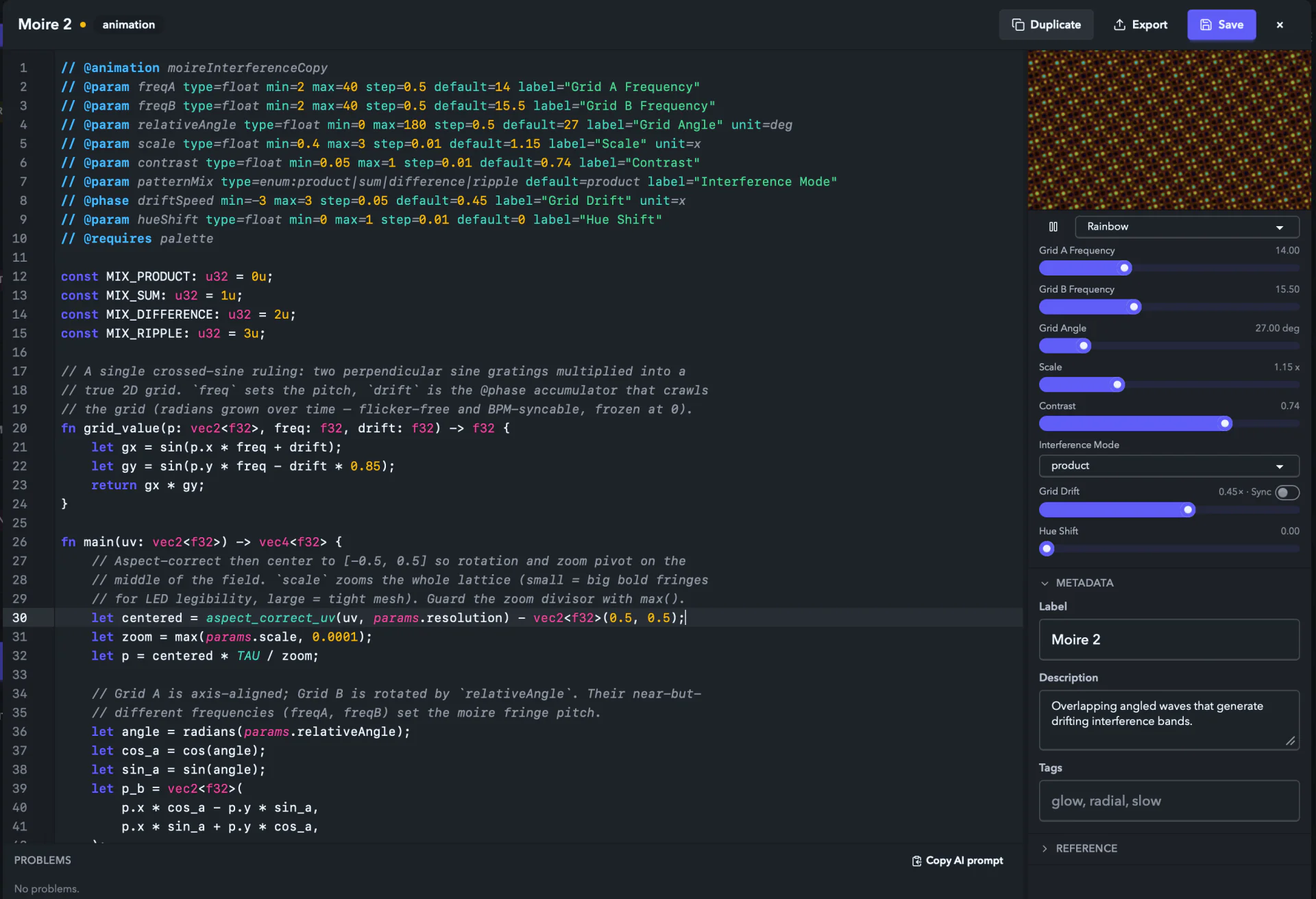
The right rail shows a live preview of the buffer you're typing, rendered by the exact same GPU runtime that drives your LEDs, with knobs for every @param you declare and a palette picker when you @requires palette. The preview always says what it is doing: once a version has compiled, a keystroke that breaks the shader leaves the last good image on screen with the error in a strip along the bottom; a buffer that has never compiled shows the error over the canvas instead of a black rectangle; and if the preview session itself fails to start, the pane prints why and offers Retry.
Under the code sits the Problems pane — every diagnostic with its line and column, click to jump. Rows tagged saved come from the file on disk when the saved version is broken and the show is still running the last good one. The button in its header copies the whole thing as an AI prompt.
Saving is deliberate: Cmd/Ctrl+S or the Save button writes to disk and hot-swaps the animation in the live show. Nothing writes until you say so, so you can mangle the buffer freely mid-set and the show keeps playing the saved version. If the file changes on disk while the editor is open, a banner offers Load disk version or Keep mine.
| Shortcut | Action |
|---|---|
⌘S / Ctrl+S | Save (hot-swaps the live show) |
⌘F / Ctrl+F | Find in source |
⌘Z / Ctrl+Z | Undo in the editor |
F8 | Jump to the next problem |
Esc | Leave the editor, then close |
The Metadata section edits the label, the description and the tags, and writes them into manifest.json on save. Everything else in the manifest stays exactly as it is on disk. The Reference section keeps the shortcuts, the prelude helper list and the full authoring contract one scroll away, with a button that copies the contract for pasting into an assistant.
You can use any external editor you like — the file watcher treats both as equal citizens.
Built-ins open in the same editor read-only via View source — and Duplicate to my library forks one into an editable copy of your own, which is the single best way to learn how these are made. The fork gets a fresh id, lands in the User group, and keeps the author, description and tags of the original.
What an animation is
An animation is a tiny program that draws one frame of color. Filament runs it once per frame, many times a second, and the result is what you see in the preview and what reaches your LEDs.
That program is written in WGSL (WebGPU Shading Language) — roughly a stripped-down C with math conveniences for graphics. You don't need to learn it to use animations other people made; just drop their file in and pick it from the library. You only need it to write your own.
Each animation ships with a small description file (a "manifest") that tells Filament its name, author, the knobs it exposes, and which group it belongs to in the picker. The shader plus the manifest are wrapped into one shareable file ending in .filament-animation.
That's the whole idea: one .filament-animation file is one animation. Post it in a forum, email it, download one from a friend. Drag it onto Filament and it appears in your library, working exactly like a built-in.
Installing a shared animation
There are two ways in.
Drag it onto the app window. The normal path for a packaged .filament-animation file:
- Open Filament.
- Drag the
.filament-animationfile onto the app window. - Filament validates and installs it, then shows an
Animation importedtoast. It's in your library, ready to use.
Copy a folder into the user animations directory. Handy when you have an unzipped bundle — a folder with animation.wgsl and manifest.json. Hit Open folder in the user animations tab (or use the table below) to reach the directory and drop the folder inside. The watcher notices it and the animation joins the library; a restart rescans the directory too.
Installed animations persist across restarts. To uninstall one, choose Delete from its tile menu in the User animations tab. Filament asks first, then removes the bundle directory from disk — it does not go to the Trash and it can't be undone.
Where they live on disk
| Platform | Path |
|---|---|
| macOS | ~/Library/Application Support/Filament/animations/user/<id>/ |
| Windows | %LOCALAPPDATA%\Filament\animations\user\<id>\ |
| Linux | ~/.local/share/Filament/animations/user/<id>/ |
When a bundle is quarantined
If a bundle fails to compile on import — say, a typo in the shader — Filament shows an Animation import failed toast with the error, moves the bundle to a sibling disabled/<id>/ folder, and drops a plain-text compile-error.txt beside it with the exact message. A bundle whose header or manifest doesn't parse at startup goes the same way, and Filament says so with a User animation disabled toast.
Quarantined bundles get their own Disabled section under the user animations, each with its reason printed in full. The wrench button opens the raw source in the editor, where the Save button reads Save and restore: a save that parses moves the bundle back into the library and registers it with the runtime, ready to drop into a cell. The ⋮ button next to it offers:
| Action | What it does |
|---|---|
Fix in editor | Same as the wrench. |
Copy AI fix prompt | The failed source, its manifest, the reason and the contract in one paste. |
Copy error text | Just the reason. |
Open library folder | Opens the user animations directory. |
Delete | Removes the quarantined bundle from disk. |
Fixing the files on disk and moving the folder back up a level works too.
The shape of an animation bundle
A bundle is a directory laid out like this:
my-animation/
├── animation.wgsl       (required) the shader program
├── manifest.json        (required) the description
├── thumbnail.png        (optional) picker image, max 1024×576
├── samples/             (optional) up to 8 example renders, samples/*.png
│   ├── default.png
│   └── ...
└── LICENSE.txt          (optional) plain-text license for the bundle
Those five entries are the entire allowlist — nothing else may be in the bundle. A thumbnail or samples entry in the manifest has to name a file that is actually there; a path with nothing behind it is a hard parse error, so never list an image you aren't shipping. Skipping the thumbnail is fine: Filament renders a tile image for user bundles that don't carry one. The built-ins ship 256×144 PNGs, which is a good size to copy.
To share it, hit Export… in the tile menu — Filament collects the bundle, verifies the result re-imports cleanly through the real importer, and writes the .filament-animation file wherever you point it. Doing it by hand works too: zip the directory's contents and rename the result to end in .filament-animation instead of .zip. That's the whole file format. The two required files are all Filament needs; everything else is optional polish.
Tempo and phase — the motion model
Before the examples, you need to know how Filament gives your shader a sense of time, because it does not hand you a raw seconds clock.
There is no time uniform. Multiplying a wall-clock reading by a speed knob makes the animation jump every time you touch the knob, and the jump grows the longer the show has been running — which is exactly the wrong behaviour on a stage. So the runtime accumulates motion on the CPU and hands your shader a smooth, already-integrated phase.
Your shader reads motion from these runtime fields, which Filament appends to your Params struct automatically (see The runtime contract):
| Field | WGSL type | What it carries |
|---|---|---|
beat | f32 | Continuous beat count, growing with the tempo. Whole numbers land on beats. |
barPhase | f32 | Position within the current 4-beat bar, in [0, 1). |
bpm | f32 | Current tempo in beats per minute. |
resolution | vec2<f32> | The project render-target size in pixels. |
phase | f32 | A smooth, ever-increasing base phase — the same accumulator as a @phase channel, running at rate 1. |
Reach for params.phase when you want motion that simply keeps going, and params.beat / params.barPhase when you want it locked to the music. beat grows continuously, so fract(params.beat) is the position inside the current beat and pow(1.0 - fract(params.beat), 4.0) is a clean downbeat spike. The tempo behind beat/barPhase/bpm comes from Filament's clock, which can sync to an external source — see Tempo & Sync.
Self-animating rate knobs: @phase
For a knob that controls how fast something moves, declare it with @phase instead of @param. A @phase channel is a float rate knob, but its slot in your Params struct doesn't carry the knob value — it carries the runtime-accumulated phase for that rate. Read the field directly and it already grows over time at the knob's rate.
The built-in metaballs works this way. It declares its two rate knobs — noiseSpeed and wobbleRate — with @phase, then reads params.wobbleRate as an angle that grows on its own:
// @phase wobbleRate min=0 max=4 step=0.05 default=1.1 label="Wobble Rate" unit=x

// ...in the body, params.wobbleRate is the accumulated phase, not the knob:
let orbit_x = sin(params.wobbleRate * (0.8 + wrap01(index * 0.29) * 0.5) + index * 1.49);
let orbit_y = cos(params.wobbleRate * (0.9 + wrap01(index * 0.41) * 0.5) + index * 2.39);
Because the motion is pre-integrated, turning a @phase knob speeds the animation up or down with no jump, freezes it cleanly at rate 0, and keeps it tempo-syncable. It's the recommended way to build any rate control. A @phase declaration takes the same numeric attributes as a float @param (min, max, default, and optional step / label / unit / valueFormat) but no type= — a phase channel is always a float.
Quick start — your first animation in ten lines
Best way to feel how this works is to build one. We'll make a "breathing palette" that smoothly cycles through the user's selected palette, with one rate knob for how fast it breathes.
1. Make a folder
Create a folder called breathingPalette and put two files inside.
2. Write manifest.json
{
  "schemaVersion": 1,
  "id": "breathingPalette",
  "label": "Breathing Palette",
  "group": "User",
  "version": "1.0.0",
  "author": "Your Name",
  "description": "Slowly cycles the palette with a soft breathing pulse.",
  "usesPalette": true
}
3. Write animation.wgsl
A header, then one function. The runtime writes everything around it — the uniform struct, the bindings, the vertex stage — so an animation is just "given this point, what colour is it?".
// @animation breathingPalette
// @phase breathe min=0 max=4 default=1 label="Breathe Rate" unit=x
// @requires palette

fn main(uv: vec2<f32>) -> vec4<f32> {
  // `breathe` is a @phase channel: it holds accumulated phase, not the knob value.
  let hue = wrap01(params.breathe * 0.1);
  let pulse = 0.5 + 0.5 * sin(params.breathe);
  let color = palette_sample(hue) * pulse;
  return vec4<f32>(color, 1.0);
}
4. Try it
Drop the breathingPalette folder into the user animations directory above — hot reload picks it up without a restart. Select it from your library and the canvas should gently pulse through your active palette, with the Breathe Rate knob speeding it up or down jump-free.
To share it, zip the breathingPalette folder's contents and rename the zip to breathingPalette.filament-animation.
That's the whole loop. Everything below is reference detail.
manifest.json reference
The manifest is plain JSON. Filament refuses to load an animation if the manifest is missing required fields, holds invalid values, or disagrees with the shader.
Fields
| Field | Type | Required | Notes |
|---|---|---|---|
schemaVersion | integer | yes | Use 1. This exists so future Filament versions can evolve the format without breaking older bundles. |
id | string | yes | A stable identifier. Camel-case, must match ^[a-z][a-zA-Z0-9]*$, max 64 characters, no spaces or punctuation. Must match the @animation line in your .wgsl exactly. |
label | string | yes | The human-readable name shown in the UI. Plain text, max 80 characters. |
group | string | yes | Which section of the picker the animation appears in. See "Group values" below. |
version | string | yes | Semantic version like 1.0.0. Must parse as three-part semver. |
author | string | yes | Free-form attribution. Plain text, max 80 characters. The key has to be there; an empty string is fine. |
description | string | no | Longer description shown in the library. Plain text, max 1000 characters. |
usesPalette | boolean | no | Defaults to false. Set to true if your shader reads the active palette. Must agree with @requires palette in the WGSL header. |
thumbnail | string | no | Relative path to a thumbnail image inside the bundle — in practice "thumbnail.png". The file has to exist. |
samples | string array | no | Relative paths to up to 8 sample renders inside the bundle. Each path must live under samples/, and each file has to exist. |
license | string | no | A short license identifier for sharing, like CC0-1.0. Plain text, max 120 characters. |
tags | string array | no | Up to 10 search tags of max 24 characters each, for sharing sites and future in-app search. |
Group values
group must be exactly one of these four strings:
| Value | Use it for |
|---|---|
"Color + Cycle" | Palette-driven cycles, gradients, washes |
"Sweeps" | Moving bands and traveling waves |
"Textures" | Generative textures, noise fields, organic shapes |
"User" | Your own animations and ones imported from the community |
Not sure? Use "User" — the default home for community animations. Any other string is rejected.
Rules about text fields
label, author, description, license, tags and any parameter labels are plain text, and Filament renders them literally — angle brackets, asterisks and backticks show up as themselves, so there is no point dressing them up. Control characters other than tab, newline, carriage return and space are rejected outright, as is anything over the length cap for its field.
Naming things well
idis internal and permanent — once people use your animation, don't change it, since their saved projects refer to it. Pick something descriptive and camel-case it:oceanRipple, notOceanRippleorocean_ripple.labelis what users see. Capitalize it nicely:"Ocean Ripple".versionfollows semantic versioning. Bump the third number for fixes (1.0.0→1.0.1), the middle for new parameters or features, the first for changes that alter the look enough to make an existing user's project look wrong.
animation.wgsl reference
The shader file has two layers:
- The header — a block of
//comments at the top, in a fixed format, that tells Filament about the shader's parameters and requirements. - The shader body — actual WGSL code that draws a frame.
The header
The header is the first contiguous run of //-prefixed lines at the top of the file, and it has to start on line 1. Filament stops reading at the first non-comment line, or the first comment line that doesn't start with // @ — so an ordinary comment above or inside the header truncates it, and the @animation line below is never seen. Put your prose comments after the header. Every header line looks like:
// @key valueRecognized keys
| Key | Cardinality | Purpose |
|---|---|---|
@animation | exactly 1 | Declares the animation's id. Must match manifest.json exactly. |
@param | any number | Declares a knob the user can adjust. See parameters below. |
@phase | any number | Declares a self-animating float rate knob — its struct slot carries accumulated phase. See Self-animating rate knobs. |
@requires | 0 or 1 | Comma-separated feature flags. palette is the only recognized one. |
Those four are the whole set. Any other @-key is an error, and so is a duplicate @animation or @requires line. @param and @phase ids share one namespace — they must all be unique within the file.
Minimal valid header
// @animation myAnimationThat's enough — zero parameters, no palette use. Most interesting animations declare at least one knob and use the palette.
Full example header
// @animation oceanRipple
// @phase waveSpeed     min=0    max=4   default=1.0  label="Wave Speed"  unit=x
// @param waveScale     type=float min=0.1  max=8   default=2.0  label="Wave Scale"
// @param brightness    type=float min=0    max=2   default=1.0  label="Brightness"  valueFormat=multiplier
// @param paletteMix    type=float min=0    max=1   default=0.5  label="Palette Mix" valueFormat=percent
// @param invert        type=bool                   default=false label="Invert"
// @param iterations    type=int   min=1    max=8   default=3    label="Iterations"
// @param accent        type=color                  default=#00aaff label="Accent"
// @param style         type=enum:warm|cool|wild    default=warm  label="Style"
// @requires palette
Parameters: types, ranges, and UI controls
Every @param declares one knob in Filament's UI. The declaration both validates the value the user picks and tells the UI how to draw the control. (@phase declares a float rate knob with the same numeric attributes but no type=.)
Parameter syntax
// @param <id> type=<type> [type-specific attributes] default=<default> [common attributes]Parameter types
| Type | UI control | Required attributes |
|---|---|---|
float | Slider | min, max, default |
int | Integer slider | min, max, default (all whole numbers) |
bool | Toggle | default=true or default=false |
color | Color picker | default=#rrggbb (exactly six hex digits) |
enum:a|b|c | Dropdown | default=a (one of the listed tags) |
Attributes
| Attribute | Applies to | Notes |
|---|---|---|
type | @param (all) | One of the type strings above. Omitted for @phase. |
min | float, int, @phase | Lower bound, inclusive. Required for these; rejected for bool, color, enum. |
max | float, int, @phase | Upper bound, inclusive. Must be greater than min. Rejected for bool, color, enum. |
default | all | Initial value. Must be valid for the type and within bounds. |
step | float, int, @phase (optional) | Slider step. Rejected for bool, color, enum. |
label | optional | Human-readable name on the control. Defaults to the id with each capital letter starting a new word (waveSpeed → Wave Speed). Max 80 characters. |
unit | optional | Short suffix shown next to the value, e.g. Hz, °, %, x. Max 16 characters. |
valueFormat | optional | One of fixed, percent, degrees, hertz, multiplier, integer. Controls how the number is displayed. When omitted it is inferred from unit (Hz→hertz, %→percent, °/deg→degrees, x→multiplier; otherwise integer for int, fixed for everything else). |
Attribute values run to the next space unless you wrap them in double quotes, which is why labels look like label="Wave Speed" and bare words like unit=x don't need them. Naming the same attribute twice on one line is an error, as is a bare word with no =.
Declaring min, max, or step on a bool, color, or enum parameter is an error — those types take no numeric range. min must be strictly less than max, and default must land inside [min, max].
Examples by type
// Float slider, 0.0 to 1.0, default 0.5, shown as a percentage
// @param mix         type=float min=0 max=1 default=0.5 label="Mix" valueFormat=percent

// Integer slider, 1 to 8, default 3
// @param iterations  type=int   min=1 max=8 default=3   label="Iterations"

// Boolean toggle (no min/max/step)
// @param invert      type=bool                  default=false label="Invert"

// Color picker (no min/max/step)
// @param accent      type=color                 default=#ff8800 label="Accent"

// Enum dropdown (no min/max/step)
// @param style       type=enum:warm|cool|wild   default=warm  label="Style"

// Self-animating rate knob (float, no type=)
// @phase spin        min=0 max=4 default=1.2 label="Spin" unit=x
Parameter id rules
- Lowercase-camel, must match
^[a-z][a-zA-Z0-9]*$, max 64 characters. - Unique within the file (shared across
@paramand@phase). - Appears in your shader's
Paramsstruct under exactly this name. - An
enum's tags are pipe-separated, each at most 32 characters and free of control characters.
The user can wire any knob to a modulation source or a MIDI control in the player — see Modulation. Your shader does nothing special for that; the runtime feeds the modulated value into the same uniform slot.
The runtime contract
Filament's shader runtime writes everything around your shader — the uniform struct, the bindings, the vertex stage and the fragment entry point. Your bundle contributes one function. That's the same deal custom effects get.
What the runtime generates
struct Params { /* your @params and @phases, then the runtime tail */ }
@group(0) @binding(0) var<uniform> params: Params;
@group(0) @binding(1) var palette_tex: texture_1d<f32>;
@group(0) @binding(2) var palette_sampler: sampler;
@group(0) @binding(3) var noise_tex: texture_2d<f32>;   // shared noise lattice
@group(0) @binding(4) var noise_sampler: sampler;
struct VertexOut { … }
@vertex fn vs_main(…) -> VertexOut { … }                // fullscreen triangle
@fragment fn fs_main(in: VertexOut) -> @location(0) vec4<f32> { return main(in.uv); }
A bundle that declares struct Params, struct VertexOut, any @group(...) binding, @vertex / vs_main, or @fragment / fs_main is rejected at parse time — those names collide with the generated ones. Mentioning them in a comment is fine; the check keys off the start of a line.
The Params struct
You don't write it, but you read it, so it's worth knowing what's in it. It lists every @param and @phase you declared, in header order, followed by the fixed runtime tail. Your knob types map this way:
@param type | WGSL field type |
|---|---|
float | f32 |
int | i32 |
bool | u32 (0 for false, 1 for true) |
color | vec3<f32> (RGB in 0..1) |
enum:a|b|c | u32 (zero-based index of the chosen tag) |
@phase | f32 (carries accumulated phase, not the raw knob value) |
After your knobs comes the tail — always in this order:
beat: f32,
barPhase: f32,
bpm: f32,
resolution: vec2<f32>,
phase: f32,
There is no time field. You never write this struct, and that is the point: the WGSL text and the byte layout the runtime packs into the uniform buffer are generated from the same header, so field order and padding cannot drift apart behind your back.
The entry point
Write one function:
fn main(uv: vec2<f32>) -> vec4<f32> {
  // ...your code...
  return vec4<f32>(r, g, b, 1.0);
}
uv ranges from (0,0) at the top-left to (1,1) at the bottom-right of the canvas. For radial work, aspect_correct_uv(uv, params.resolution) squares it up.
One WGSL rule bites here: you cannot shadow a function parameter, so let uv = aspect_correct_uv(uv, …) is a compile error. Either name the corrected value something else, or rename the parameter — it is positional, so the name is entirely yours. The built-ins take the second route:
fn main(in_uv: vec2<f32>) -> vec4<f32> {
  let uv = aspect_correct_uv(in_uv, params.resolution);
  // ...
}
The render target format is Rgba16Float, so you can write values outside 0..1 without clipping. The downsample-and-output stage clamps to display range, but high-dynamic-range intermediate values are fine and sometimes useful for bloom-like effects.
Return alpha 1.0 unless you specifically want layers beneath yours to show through — that fourth component is coverage, not brightness.
What you cannot do
- No file includes or imports.
- No external network access.
- No reading or writing files.
- No persistent state across frames — derive motion from
phase,beat, and your@phasechannels. - No declaring your own bindings; the five above are all there are.
These aren't just policy. The bundle is validated before install and the WGSL is compiled with naga; anything that violates the contract fails to compile.
Using the global palette
The user picks a palette in Filament's main UI. If your shader sets @requires palette and the manifest has "usesPalette": true, your shader gets the active palette as a 1-D texture, plus a built-in helper:
let color = palette_sample(t);t is a float; palette_sample wraps it to [0, 1) and returns an RGB vec3. Use it any time you want to color something with the user's chosen scheme:
let hue_position = uv.x + params.phase * 0.2;
let color = palette_sample(hue_position);
return vec4<f32>(color, 1.0);
The user can change the palette any time and your animation picks it up on the next frame. Per-cell palettes and the global default are covered in Palettes. Letting users dress your animation in their palette is what makes it feel like a member of Filament rather than a stranger glued on.
Opting out of the palette
For fixed colors that the user's palette shouldn't touch, omit @requires palette and set "usesPalette": false (or omit the field — it defaults to false). The manifest flag and the @requires palette line must agree, or the bundle is rejected.
The runtime declares the palette bindings for every animation, so palette_sample compiles either way. Declaring @requires palette is how you tell Filament — and the person installing your bundle — that the animation is palette-driven.
Master effects: what happens after your shader runs
Filament runs a master effects chain on top of every animation — a chain the user builds (trails and hue rotation among them), described on the Master & Preview page.
You don't implement them. Your shader writes a single frame of color, and the master-effects chain runs afterwards. Two practical consequences:
- Don't bake trails or hue rotation into your shader. The user can add those as master effects, and your own will fight with theirs.
- Your shader's output is linear RGB. The master-effects pass operates on that linear value before it reaches the LEDs or the preview.
Helper functions (the prelude)
Filament prepends a small set of helpers to every animation. Call them without declaring anything — they make common patterns like noise, rotation, and hue conversion painless.
| Function | Returns | What it does |
|---|---|---|
wrap01(value) | f32 | Folds any float into [0, 1) (fract) |
smoothstep_unit(value) | f32 | Smooth Hermite interpolation, clamped to [0, 1] |
hash2d(p) | f32 | Cheap sine-free hash of a vec2<f32>, for decorrelated per-cell randoms |
value_noise(p) | f32 | Smooth 2D value noise, one lattice fetch |
value_noise2(p) | vec2<f32> | Two decorrelated noise fields for the price of one; .x matches value_noise(p) |
fbm_noise(p) | f32 | Fractional Brownian motion, 5 octaves of value_noise |
fbm_noise2(p) | vec2<f32> | Paired fbm for domain warps; .x matches fbm_noise(p), at half the cost of two calls |
rotate_centered(uv, degrees) | vec2<f32> | Rotates a UV around (0.5, 0.5) |
aspect_correct_uv(uv, resolution) | vec2<f32> | Re-centers and scales uv so circles stay round on non-square canvases |
glow_band(distance_value, radius, softness) | f32 | Smooth glow falloff inside a radius |
wrapped_band(position, center, width, fuzziness) | f32 | A soft band that wraps around the [0, 1) seam |
hsv_to_rgb(h, s, v) | vec3<f32> | HSV to linear RGB |
checkerboard_secondary(base_color, contrast) | vec3<f32> | Blends a contrasting companion color toward the base |
distance_to_segment(p, a, b) | f32 | 2D point-to-line-segment distance |
distance_to_segment_sq(p, a, b) | f32 | The same distance, squared. Use it when you only need the square — it skips a sqrt you'd only undo |
add_color(a, b) | vec3<f32> | Saturating (clamped) color add |
palette_sample(t) | vec3<f32> | Reads the active palette; wraps t, so any value is safe |
Every helper whose name has an underscore also answers to its camelCase spelling — fbmNoise2, aspectCorrectUv, distanceToSegmentSq, paletteSample — so call whichever reads better. wrap01 and hash2d have no underscore and so have one spelling each. The constant TAU (= 2π) is also available.
Guard your divisors. A zero-width band or a zero spacing produces a NaN, and a NaN spreads across the whole surface rather than staying in one pixel.
You can read the prelude in full at src-tauri/resources/animations/_prelude.wgsl in the source tree, in the editor's Reference section, or by opening any built-in animation that uses these helpers.
Sharing your animation
When you're ready to share:
- Make sure your folder has at least
animation.wgslandmanifest.json. - Optionally add
thumbnail.png(256×144 recommended, max 1024×576). - Optionally add a
samples/subfolder with up to 8 example renders (max 1280×720 each). - Optionally add
LICENSE.txt(max 16 KB) with your terms. - Zip the contents of the folder, not the folder itself —
manifest.jsonshould be at the root of the zip. - Rename the resulting
.zipto.filament-animation.
On macOS:
cd path/to/my-animation
zip -r ../my-animation.filament-animation . -x '.*' '__MACOSX/*'
The exclusions matter: a stray .DS_Store or __MACOSX entry is not on the allowlist and the whole bundle is rejected. Export… never has this problem, because it builds the archive from the allowlist outwards.
On Windows PowerShell:
Compress-Archive -Path .\my-animation\* -DestinationPath .\my-animation.zip
Rename-Item .\my-animation.zip .\my-animation.filament-animation
Iterating quickly with hot reload
Filament watches the user animation directory. While the app is running, edit animation.wgsl or manifest.json of an installed user animation and save — Filament re-parses and re-compiles the bundle within a fraction of a second. The preview swaps over without dropping any master-effects history: trails keep their decay state across the swap.
The natural development loop, whichever editor you use:
- Drop your bundle into the user animations directory once.
- Open it in Filament and load it into a cell.
- Edit
animation.wgsl. - Save.
- Watch the preview update.
The in-app editor shortens that further — it previews the buffer as you type, before you save anything.
Filament distinguishes three kinds of change:
- WGSL or parameter-shape change — recompiles the shader pipeline and swaps it atomically. Since parameters are declared only in the WGSL header, any parameter add/remove or range change is a recompile.
- Manifest-only metadata change (label, description) — updates the library entry without rebuilding the pipeline, so it's essentially instant.
- Compile or parse error — Filament keeps the previous version active, shows an
Animation compile errortoast with the message, and badges the tileBroken on disk — running the last good version. The bundle is not disabled while you hot-reload; fix the error, save again, and the new version takes over. The tile's prompt action switches toCopy AI fix promptfor as long as the saved file is broken.
In development builds, the status bar shows a Watching N animations indicator (with a "Last reload events" panel) so you can confirm a save was picked up. It doesn't appear in release builds.
Limits and safety rules
Filament treats every .filament-animation file as untrusted input, even one you wrote yourself. It validates a bundle before installing and rejects anything that breaks these rules.
Structural rules
- The only allowed entries are
animation.wgsl,manifest.json,thumbnail.png,samples/*.png, andLICENSE.txt. - No path traversal (
.., absolute paths, backslashes, Windows drive prefixes), no symlinks, no directory entries, no encrypted entries. - No hidden entries — a path segment starting with
.is rejected, which is whyzipon macOS wants-x '.*'if your folder has picked up dotfiles. - No more than 32 entries in the archive.
- No duplicate paths, including case-insensitive duplicates.
Size limits
| Item | Limit |
|---|---|
| Total uncompressed contents | 5 MB |
animation.wgsl | 256 KB |
manifest.json | 64 KB |
LICENSE.txt | 16 KB |
thumbnail.png | 1 MB, max 1024×576 |
Each samples/*.png | 1 MB, max 1280×720 |
| Total sample images | 8 |
| Compression ratio | Any entry whose uncompressed size is more than 100× its compressed size is rejected. |
Content rules
- Plain text everywhere: no control characters other than tab, newline, carriage return and space.
label,author, and any parameterlabel: max 80 characters each.description: max 1000 characters.license: max 120 characters.tags: up to 10, max 24 characters each, none empty.- Parameter
unit: max 16 characters. - Enum tag: max 32 characters.
- Every
id— the bundle's and each parameter's — matches^[a-z][a-zA-Z0-9]*$, max 64 characters. - All images must be valid PNGs within their bounds, and every path the manifest names must exist in the bundle.
Shader rules
- WGSL only — no GLSL, no SPIR-V.
- No
#includeor external file references. - Must define
fn main(uv: vec2<f32>) -> vec4<f32>, and must not declare anything the runtime generates (struct Params,struct VertexOut, any@group(...),@vertex/vs_main,@fragment/fs_main). - Must compile with
naga(the WGSL frontend used by the Rust runtime). - A bundle that fails to compile on import is moved to
disabled/<id>/with acompile-error.txtand is not loaded until you fix it. So is one whose header or manifest fails to parse at startup.
Identity rules
- Your
idcannot match a built-in animation's id. If it does, the import is rejected withanimation {id} already ships with Filament— rename your bundle inmanifest.json(and the@animationline) and try again. - Your
idcannot match an existing user animation's id either. The import is rejected withanimation {id} already exists in your library— there is no "replace?" prompt. To swap in a new version, delete the existing bundle's folder on disk first, then import.
These limits are deliberately strict. If a real community bundle ever needs more, they'll be raised.
Troubleshooting
"animation X already ships with Filament"
Your id collides with a built-in. Open manifest.json, change id to something unique, and update the matching @animation line in the .wgsl. The two must always agree.
"animation X already exists in your library"
You imported a bundle whose id matches one already installed, and Filament won't overwrite it. Open the user animations folder (Open folder), delete the existing <id>/ directory, then import again.
"Animation compile error" / nothing draws
The WGSL has a syntax or semantic error. Hot-reloading an edit keeps the previous version active and shows the message in a toast; a freshly imported bundle that fails is moved to disabled/<id>/ with compile-error.txt. Common causes:
- Missing
fn main(uv: vec2<f32>) -> vec4<f32>, or it returns the wrong type. - Shadowing the
uvparameter with alet uv = …at the top ofmain. WGSL forbids it; rename the parameter toin_uvinstead. - Reading a
paramsfield that isn't declared — the struct only holds the ids in your header plusbeat,barPhase,bpm,resolution,phase. - Declaring something the runtime generates. That one is caught before install, with a message naming the offender.
"Manifest and shader disagree on palette"
Your manifest says "usesPalette": true but your shader doesn't declare // @requires palette (or vice versa). Make the two agree.
The import fails on a file you didn't think was in there
Two usual suspects. A thumbnail or samples entry in manifest.json that names an image you never shipped is a missing-file error — drop the key or ship the PNG. And a zip built with zip -r on macOS carries .DS_Store and sometimes __MACOSX/, neither of which is on the allowlist. Rebuild it with the exclusions above, or just use Export….
The header is ignored
The header has to be the first thing in the file, starting on line 1. A licence blurb, a blank line or an ordinary // comment above it ends the header before it starts, and what you get back is invalid WGSL header: line 1: missing @animation line. Move your prose below the directives.
The editor preview is empty
The preview tells you which case you're in:
- A message with a
Retrybutton — the preview session never started. HitRetry; if it keeps failing, the runtime lost its GPU adapter and the app log has the reason. - An error over the canvas — the buffer has never compiled, so there is no image to show yet. The text is the first error; the Problems pane has the rest with line numbers.
- An error in a strip along the bottom — the last good version is still on screen and your current edit doesn't compile. Keep typing; the strip clears when it does.
The preview renders, but it's black
- If you read the palette and your active palette is all black, the output is black. Pick another palette from the selector under the preview.
- A
@phaseknob at rate0freezes the motion by design. Raise the rate. - If the math bottoms out to
vec4<f32>(0.0, 0.0, 0.0, 1.0), that's what you'll get. Divide by a guarded value —max(x, 0.0001)— and watch for a NaN, which takes the whole surface with it.
The animation lags or stutters
Usually too much work per pixel in a long loop. A high iterations value runs a lot of work for every pixel — cap the count, or do the heavy work less often.
Worked example: a second animation
A complete, working bundle using several parameter types, a @phase rate, the palette, and a couple of prelude helpers. It draws a noisy field that warps and tints over time.
manifest.json:
{
  "schemaVersion": 1,
  "id": "warpField",
  "label": "Warp Field",
  "group": "Textures",
  "version": "1.0.0",
  "author": "Example",
  "description": "Warping noise field tinted by the active palette.",
  "usesPalette": true,
  "tags": ["noise", "warp", "palette"]
}animation.wgsl:
// @animation warpField
// @phase flow        min=0   max=4 default=1.0 label="Flow"       unit=x
// @param scale       type=float min=0.5 max=8 default=2.5 label="Scale"
// @param warpAmount  type=float min=0   max=2 default=0.6 label="Warp"
// @param brightness  type=float min=0   max=2 default=1.0 label="Brightness" valueFormat=multiplier
// @param invert      type=bool                 default=false label="Invert"
// @requires palette

// `in_uv` rather than `uv`, because the body wants `uv` for the corrected
// coordinate and WGSL forbids shadowing a parameter.
fn main(in_uv: vec2<f32>) -> vec4<f32> {
  let uv = aspect_correct_uv(in_uv, params.resolution);
  let p = uv * params.scale;
  let t = params.flow;

  // fbm_noise2 gives two decorrelated fields from one lattice walk, which is
  // exactly what a 2-D domain warp wants — and half the cost of two fbm calls.
  let warp = (fbm_noise2(p + vec2<f32>(t * 0.1, t * 0.1)) - vec2<f32>(0.5)) * params.warpAmount;

  let field = fbm_noise(p + warp + vec2<f32>(t * 0.05, -t * 0.07));
  var sample_t = field;
  if (params.invert == 1u) {
    sample_t = 1.0 - field;
  }

  let color = palette_sample(sample_t) * params.brightness;
  return vec4<f32>(color, 1.0);
}
Save the two files into a folder called warpField, zip the contents, rename to warpField.filament-animation, and drop it on Filament.
Reference card for AI agents and frameworks
A compact spec for tools generating animation bundles programmatically. Everything here is also covered above in prose.
Bundle requirements
- Directory or zip with extension
.filament-animation. - Required files at the root:
animation.wgsl,manifest.json. - Optional:
thumbnail.png,samples/*.png(≤ 8),LICENSE.txt. - No other files, no subdirectories beyond
samples/, no traversal, no symlinks, no directory entries, no path segment starting with.. - Hard limits: 32 entries, 5 MB total uncompressed, 256 KB WGSL, 64 KB manifest, 16 KB license, 1 MB per image,
thumbnail.png≤ 1024×576,samples/*.png≤ 1280×720, compression ratio ≤ 100:1.
Manifest schema (manifest.json)
{
  "schemaVersion": 1,
  "id": "string, ^[a-z][a-zA-Z0-9]*$, ≤64 chars, must equal @animation",
  "label": "string, ≤80 chars, plain text",
  "group": "Color + Cycle | Sweeps | Textures | User",
  "version": "semver string, e.g. 1.0.0",
  "author": "string, ≤80 chars, may be empty but the key is required",
  "description": "string, optional, ≤1000 chars",
  "usesPalette": false,
  "thumbnail": "thumbnail.png",
  "samples": ["samples/example.png"],
  "license": "string, optional, ≤120 chars",
  "tags": ["optional", "≤10 tags", "≤24 chars each"]
}schemaVersion, id, label, group, version and author are required; everything else is optional. thumbnail and samples must name PNG files that are actually in the bundle — a path with no file behind it is a hard parse error, so omit both fields unless you are shipping the images.
WGSL header grammar
The first contiguous run of //-prefixed lines at the top of the file is the header, starting on line 1. One annotation per line. Parsing stops at the first non-@ comment or non-comment line, so never put another comment above or inside the header. These four keys are the whole set; any other // @ key is a hard error.
// @animation <id>
// @param <id> type=<type> default=<value> [min=<n> max=<n>] [step=<n>] [label="..."] [unit=<text>] [valueFormat=<fmt>]
// @phase <id> min=<n> max=<n> default=<n> [step=<n>] [label="..."] [unit=<text>] [valueFormat=<fmt>]   (float rate knob, no type=)
// @requires palette                   (allowlist; only "palette")
<type> ∈ float | int | bool | color | enum:<tag>|<tag>....
<fmt> ∈ fixed | percent | degrees | hertz | multiplier | integer.
@animation appears exactly once; @requires at most once. Parameter/phase id pattern: ^[a-z][a-zA-Z0-9]*$, ≤64 chars, unique within the file (shared namespace). float and int require min and max, with min < max. default must satisfy the type and bounds. bool, color, and enum must not declare min/max/step. int min/max/default must be whole numbers. color defaults are #rrggbb. Enum tags are pipe-separated, ≤32 chars each. Attribute values end at whitespace unless double-quoted; repeating an attribute on one line is an error.
Generated by the runtime — never declare these
struct Params { /* @params and @phases in header order, then the tail below */ }
@group(0) @binding(0) var<uniform> params: Params;
@group(0) @binding(1) var palette_tex: texture_1d<f32>;
@group(0) @binding(2) var palette_sampler: sampler;
@group(0) @binding(3) var noise_tex: texture_2d<f32>;
@group(0) @binding(4) var noise_sampler: sampler;
struct VertexOut { @builtin(position) position: vec4<f32>, @location(0) uv: vec2<f32> }
@vertex fn vs_main(@builtin(vertex_index) vi: u32) -> VertexOut { /* fullscreen triangle */ }
@fragment fn fs_main(in: VertexOut) -> @location(0) vec4<f32> { return main(in.uv); }
A bundle declaring struct Params, struct VertexOut, any @group(, @vertex, fn vs_main, @fragment or fn fs_main at the start of a line is rejected at parse time. Comments mentioning them are fine.
Params contents
Fields are your @param / @phase entries in header declaration order, then the fixed tail. There is no time field. Type mapping:
| Header declaration | WGSL field |
|---|---|
float | f32 |
int | i32 |
bool | u32 |
color | vec3<f32> |
enum:... | u32 (zero-based tag index) |
@phase | f32 (runtime-accumulated phase) |
Fixed tail, always last and in this order:
beat: f32,
barPhase: f32,
bpm: f32,
resolution: vec2<f32>,
phase: f32,
Entry-point contract
- Define exactly one function:
fn main(uv: vec2<f32>) -> vec4<f32>. uvis(0,0)top-left to(1,1)bottom-right. The parameter name is positional — rename it if the body needsuvfor something else, because WGSL forbids shadowing a parameter.- Render target format is
Rgba16Float; HDR intermediate values are allowed. Colour is linear RGB. Return alpha1.0unless you mean layers beneath to show through. - No persistent state across frames, no storage buffers, no
#include, no network or file access. Master effects run after your shader — don't bake trails or hue rotation into it.
Prelude (auto-prepended to every shader)
Available without declaration:
- Constant:
TAU(= 2π). - Functions:
wrap01(value),smoothstep_unit(value),hash2d(p),value_noise(p),value_noise2(p),fbm_noise(p),fbm_noise2(p),rotate_centered(uv, degrees),aspect_correct_uv(uv, resolution),glow_band(distance_value, radius, softness),wrapped_band(position, center, width, fuzziness),hsv_to_rgb(h, s, v),checkerboard_secondary(base_color, contrast),distance_to_segment(p, a, b),distance_to_segment_sq(p, a, b),add_color(a, b). value_noise2andfbm_noise2returnvec2<f32>— two decorrelated fields from one fetch, with.xidentical to the single-channel version. Everything else returnsf32exceptrotate_centered/aspect_correct_uv(vec2<f32>) andhsv_to_rgb/checkerboard_secondary/add_color(vec3<f32>).- Every name containing an underscore also exists in camelCase (
valueNoise2,aspectCorrectUv,distanceToSegmentSq).wrap01andhash2dhave one spelling each. - Palette helpers (always present):
palette_sample(t: f32) -> vec3<f32>andpaletteSample. Sampling useswrap01(t), so anytis safe. - Guard every divisor: a zero-length band or spacing produces a NaN across the whole surface.
Failure modes
| Condition | Result |
|---|---|
| Manifest invalid / required field missing | Import rejected with an Animation import failed toast. |
id collides with a built-in | Import rejected with an Animation import failed toast: animation {id} already ships with Filament. |
id collides with an existing user bundle | Import rejected with an Animation import failed toast: animation {id} already exists in your library. No replace prompt. |
| Any security/limit violation | Import rejected, no files written. |
| Manifest disagrees with WGSL (id mismatch, palette mismatch) | Import rejected with an Animation import failed toast. |
Manifest names a thumbnail / samples path with no file behind it | Parse fails; the bundle never loads. |
| WGSL fails to compile on import | Bundle moved to disabled/<id>/ with compile-error.txt, and an Animation import failed toast shows the WGSL error. |
| Header or manifest fails to parse at startup | Bundle moved to disabled/<id>/ with compile-error.txt; a User animation disabled toast lists what was quarantined, and the Disabled section keeps it on screen. |
| WGSL fails to compile at startup | Bundle stays listed and editable; it renders nothing until a save fixes it. |
| WGSL fails to compile during hot reload | Previous pipeline stays active; Animation compile error toast, and the tile badges. Bundle not disabled. |
| A repair save still fails to parse | Rejected with the parse error; the bundle stays in disabled/<id>/. |
Filesystem locations
| Platform | User animations |
|---|---|
| macOS | ~/Library/Application Support/Filament/animations/user/ |
| Windows | %LOCALAPPDATA%\Filament\animations\user\ |
| Linux | ~/.local/share/Filament/animations/user/ |
Each bundle lives under <root>/<id>/. Disabled bundles live under <root>/disabled/<id>/.
Minimal valid bundle
manifest.json:
{
  "schemaVersion": 1,
  "id": "minimal",
  "label": "Minimal",
  "group": "User",
  "version": "1.0.0",
  "author": "Author"
}animation.wgsl:
// @animation minimal

fn main(uv: vec2<f32>) -> vec4<f32> {
  let r = 0.5 + 0.5 * sin(params.phase);
  return vec4<f32>(r, uv.x, uv.y, 1.0);
}
That bundle compiles, imports, and runs. Use it as a starting point for any generated animation.
Animations & Palettes
Browse Filament's built-in animation catalog, drop clips onto the grid, tune them live with presets and BPM-synced playback, and re-tint everything with color palettes.
Palettes
Build color palettes, switch them per animation cell during a show, and share them as a single .filament-palette file.