OSC Control
Drive Filament over the network with OSC — send to a documented /filament/... address to move any parameter or fire any action, with feedback so a phone, tablet, console, or Max patch stays in sync. No cables, no mapping step.
OSC (Open Sound Control) lets anything on your network drive Filament — a tablet running TouchOSC, a lighting or show-control console, a Max/Chataigne patch, a script. Unlike MIDI, there's no cable and no learn step: every parameter and action already has a fixed address like /filament/master/brightness. Point your controller at it and it works.
Send a value to a continuous address and the parameter moves — same as grabbing the fader yourself. Send to a trigger address and the action fires. And Filament sends values back out, so a controller's motorized faders and toggle lights track whatever happens in the app.
Turning it on
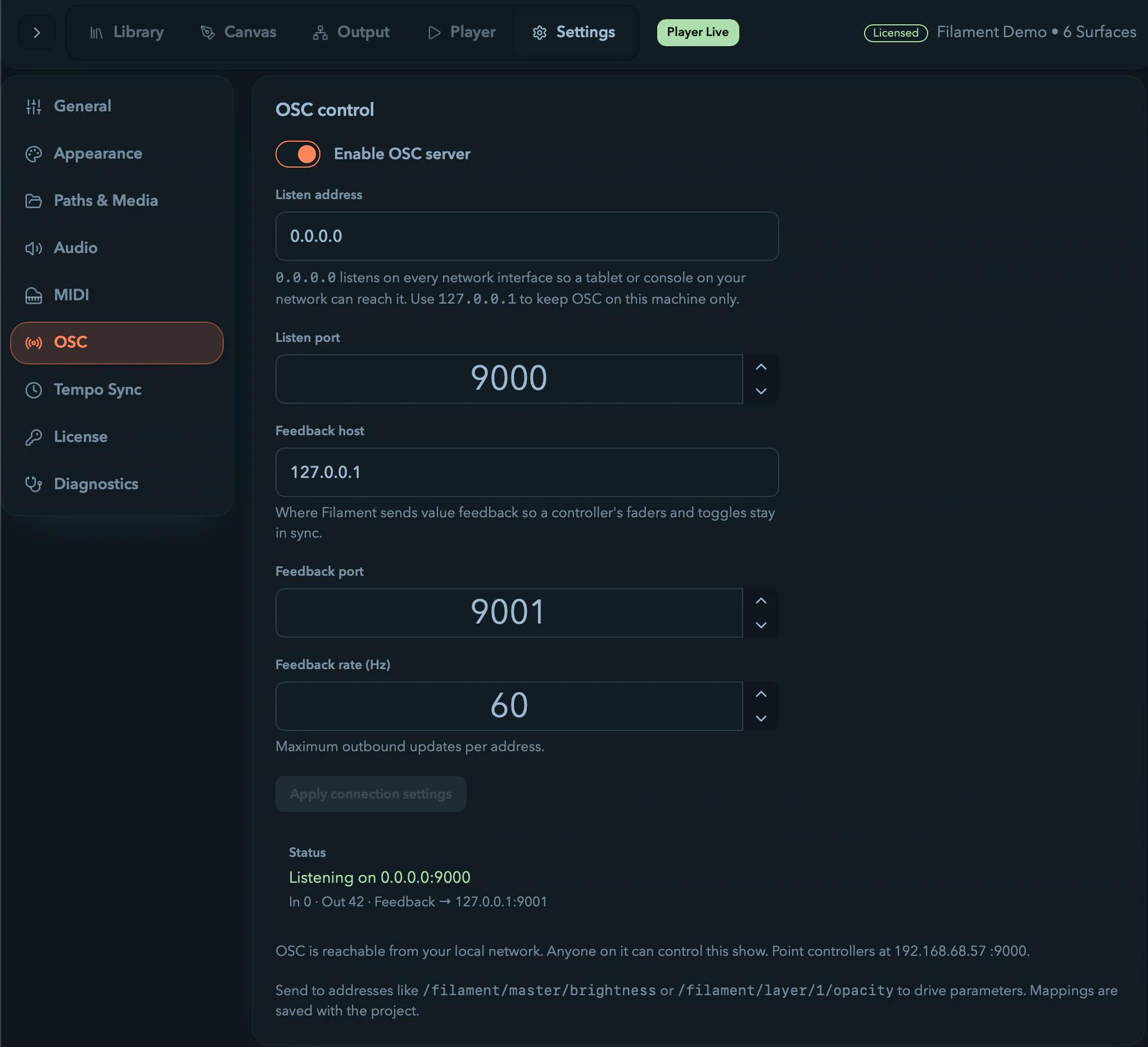
Open Settings → OSC and flip Enable OSC server. The defaults listen for OSC on port 9000 and send feedback to 127.0.0.1:9001.
| Setting | What it does |
|---|---|
Listen address | 0.0.0.0 (the default) listens on every network interface, so a phone or console elsewhere on your network can reach it. Use 127.0.0.1 to keep OSC on this machine only. |
Listen port | The UDP port Filament receives on. Point your controller here. |
Feedback host / port | Where Filament sends value updates so your controller stays in sync. |
Feedback rate | The cap on outbound updates per address (Hz). |
The status card shows whether the server is listening, its address, packet counts, and any error — a port already in use shows up here rather than failing silently.
A note on network exposure. Binding to 0.0.0.0 means anyone on your local network can control the show — OSC has no password. The settings page shows your machine's address and a reminder while a network-wide bind is active. Set the listen address to 127.0.0.1 if you want control kept to this machine.
Addresses
Everything Filament exposes lives under /filament. Each target has two equivalent addresses:
- an ordinal form —
/filament/layer/1/opacity— readable, where the number is the layer's position (1st, 2nd…). Reordering layers changes what it points at. - a stable form —
/filament/layer/<id>/opacity— using the layer's internal id, which never shifts on reorder. Copy it from the address browser.
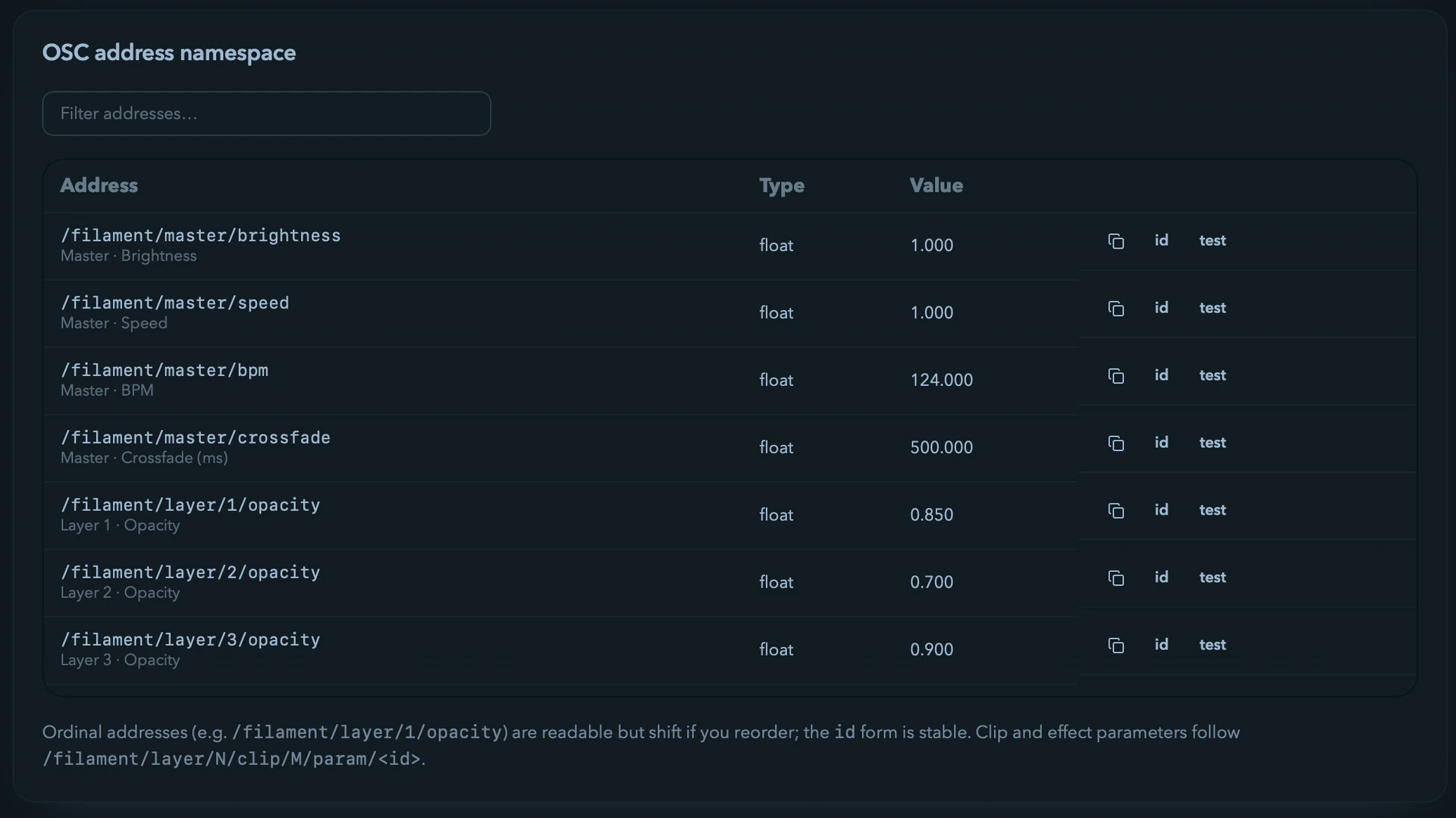
Both hit the same target, so use whichever suits you: ordinals to hand-type, the stable form for a saved controller layout you don't want to break.
Parameters (send a value)
Float value, in the parameter's own units — Filament clamps it to range. The value becomes the parameter's value, shows in the UI, and saves with the project.
| Target | Address | Range |
|---|---|---|
| Master brightness | /filament/master/brightness | 0–1 |
| Master speed | /filament/master/speed | 0.1–3 |
| Master BPM | /filament/master/bpm | 20–320 |
| Master crossfade | /filament/master/crossfade | 0–5000 ms |
| Layer opacity | /filament/layer/N/opacity | 0–1 |
| Clip parameter | /filament/layer/N/clip/M/param/<id> | per parameter |
| Effect parameter | /filament/<scope>/fx/K/param/<id> | per parameter |
| Effect mix | /filament/<scope>/fx/K/mix | 0–1 |
<scope> is master, layer/N, or layer/N/clip/M — whichever chain the effect sits on. <id> is the parameter's own name.
Actions (fire a trigger)
| Action | Address |
|---|---|
| Launch a clip | /filament/layer/N/clip/M/launch |
| Launch a column (scene) | /filament/column/M/launch |
| Stop a layer | /filament/layer/N/stop |
| Enable / bypass a layer | /filament/layer/N/enabled |
| Enable / bypass an effect | /filament/<scope>/fx/K/enabled |
| Play / pause | /filament/transport/playpause |
| Blackout | /filament/transport/blackout |
| Tap tempo | /filament/transport/tap |
| Resync | /filament/transport/resync |
| Trigger a modulation | /filament/modulation/<id>/trigger |
How the argument is read depends on the action:
- Momentary actions (launch, stop, tap, resync) fire on a no-argument message, or a number
≥ 0.5, ortrue. With an argument they fire on the press only — a button that sends1then0fires once, not twice. - On/off actions (
enabled,playpause,blackout) set state from the argument:≥ 0.5turns on, below turns off — so a TouchOSC toggle maps straight across. Send no argument and it flips the current state instead.
Feedback
While the server is on, Filament sends the current value of each parameter and on/off state back to your feedback host — on change, throttled to the feedback rate — so faders and toggle lights mirror the app, whether the change came from OSC, MIDI, a mouse, or an animation. Feedback always uses the ordinal address form.
Two housekeeping addresses help controllers connect cleanly:
- Send
/filament/syncto get a full dump of every current value at once — handy the moment a controller connects. - Send
/filament/pingand Filament replies/filament/pongso a patch can confirm it's talking to the right machine.
Finding and testing addresses
Settings → OSC has two panels for exactly this — the "why isn't my control working?" answer usually lives here.
-
The address browser lists every routable address with its live value, a filter box, and copy buttons for both the readable and stable forms. It's the reference you copy into TouchOSC or Max.
-
The monitor shows OSC arriving in real time and tags each message as
knownor not, so a typo or a wrong target is obvious at a glance.
OSC and MIDI, side by side
OSC's fixed scheme is a different feel from MIDI: there's no learn gesture and no per-binding row in the Connections tab. An OSC parameter message simply sets the value — like a remote hand on the fader — so it doesn't take a parameter's modulation slot the way a MIDI fader does. Reach for MIDI when you want a controller learned to a target with its own curve; reach for OSC when you want a networked surface, feedback, or to drive Filament from software.
A quick test
With the server enabled, from any machine that can reach it (using python-osc or oscsend):
# Set master brightness to 50%
oscsend <filament-ip> 9000 /filament/master/brightness f 0.5

# Launch the clip at layer 1, column 2
oscsend <filament-ip> 9000 /filament/layer/1/clip/2/launch

# Toggle blackout on
oscsend <filament-ip> 9000 /filament/transport/blackout i 1
Watch the master bar move and the monitor light up. If nothing happens, check the monitor tags the address known — an unrecognized address is almost always a typo or the wrong layer/column number.
MIDI Control
Map a hardware controller to Filament — learn a fader to any parameter, fire clips and transport from pads, and manage every binding in the Connections tab.
Tempo & Sync
Set the beat by hand or follow an external clock — Ableton Link, Pro DJ Link, or MIDI Clock — so beat-synced animations, effects, and envelopes land on the music.