Palettes
Build color palettes, switch them per animation cell during a show, and share them as a single .filament-palette file.
Filament ships a set of curated palettes, but you can also build your own, edit them while a show runs, and share them with other performers as a single file.
The first half of this page needs no code knowledge. The last section is a compact reference an AI coding assistant can follow if you ask it to generate a palette for you.
What a palette is
A Filament palette is an ordered list of colors — that's all. Animations sample colors out of the active palette as they run, so changing the palette instantly re-tints the animation. Same motion, different mood.
The Recolour effect extends this to any clip: it maps a clip's luminance through the cell's active palette, so switching the palette re-tints a video or animation live.
A palette has three parts:
- A label — what you call it (
Synth Sunset,Stage 1 Reds). This is theNamefield in the editor. - An id — a short machine-readable handle (
synth-sunset,stage-1-reds), generated from the name. You almost never see it. - A list of colors — 1 to 256 of them, each a six-digit hex code like
#ff5a2a. One color makes a solid wash; 256 makes a very smooth gradient. Most palettes run three to eight.
Picking a palette during a show
The palette switcher is its own Palette rack at the bottom of the Effect Parameter Panel — the panel that opens when you select a cell. It appears only for animation cells; video and external-source cells don't read palettes, so the rack stays hidden.
Palettes are assigned per cell, not globally, so two cells can play the same animation with different palettes. Click any chip and the cell re-tints immediately — no save step.
The header row's chevron collapses or expands the rack:
- Expanded — every chip shows in a wrapping grid; chips wrap onto new rows rather than scrolling horizontally.
- Collapsed — the rack shrinks to one compact chip showing the active palette's gradient and name. Click it to expand again.
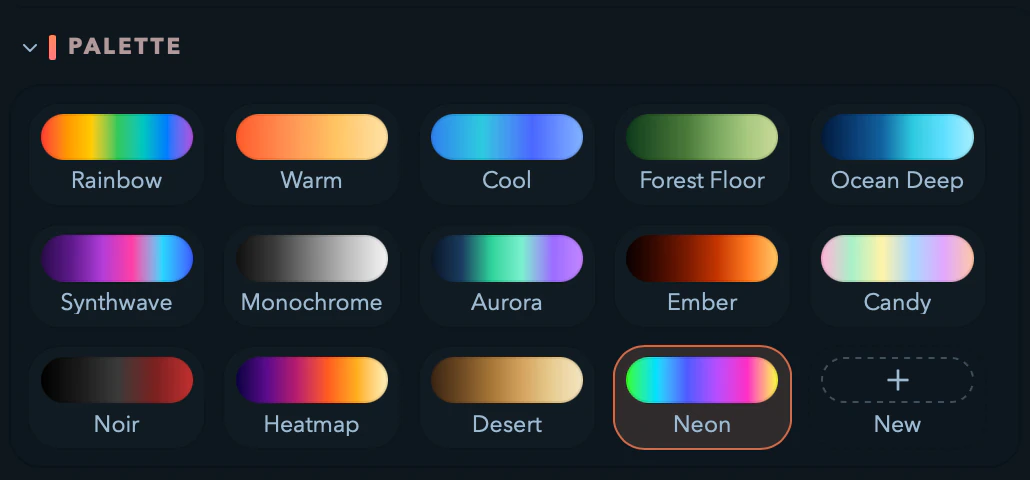
Each chip shows a small gradient plus the palette's name, and the active one wears a bright ring. Hover or keyboard-focus a chip to reveal two icons: a pencil (opens the editor) and a trash (deletes it — only user palettes show it; built-ins can't be deleted). At the end of the grid, a New chip (a + tile) creates a palette from scratch.

Built-in palettes
Filament ships fourteen curated palettes. Built-ins always sit at the front of the switcher. You can't edit or delete them, but you can duplicate any into a user palette and tweak the copy.
Creating your own palette
- Click the New chip at the end of the Palette rack.
- The editor opens titled New palette with a single starter color.
- Give it a name in the
Namefield — the id is generated automatically. - Add your colors (see Editing the colors).
- Click Save. The palette appears in the switcher and is assigned to the current cell immediately.
Re-open the editor any time by hovering a chip and clicking the pencil.
Naming tips
- Keep it short — the chip truncates long names.
- Name the mood, not the colors:
Cold openbeatsBlue thingin a live setting. - Up to 64 characters of plain text. Control characters are rejected; ordinary Unicode is fine.
Editing the colors
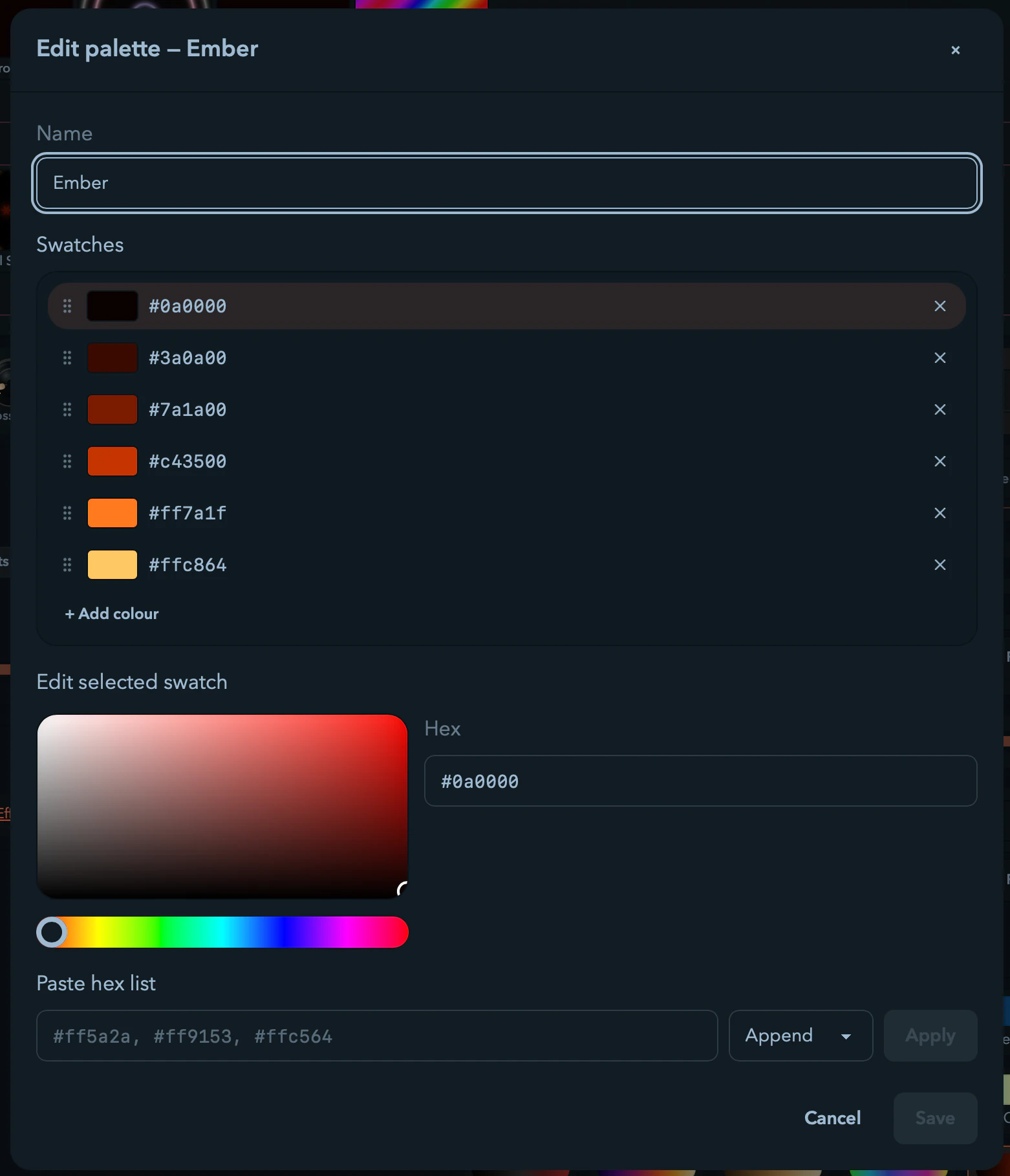
The editor is a dialog with four areas: the Name field, the Swatches list, the Edit selected swatch picker, and a Paste hex list box.
The Swatches list
This is the ordered list of colors in your palette. Order matters — animations sample left to right.
- Click a row to edit it; the picker updates to match.
- Drag the grip (
⋮⋮) to reorder, or focus a handle and pressAlt + ↑/Alt + ↓. - Click the
×to remove a swatch. It's hidden once one swatch remains, so a palette never drops below one color. + Add colourappends a swatch copied from the last one, ready to edit. Disabled at 256 colors.
The Edit selected swatch picker
- The 2-D square sets saturation and brightness — top-right for vivid, top-left for white, bottom for black. Arrow keys nudge (Shift for larger steps); Home/End jump to fully unsaturated/saturated.
- The hue slider below picks the hue.
- The
Hexfield takes a six-digit code, with or without the leading#. Only#rrggbbis valid — three-digit shorthand and eight-digit alpha aren't accepted.
Changes update the selected swatch live. The live preview elsewhere keeps showing each cell's saved palette while you edit, so you can fiddle mid-show without the lights flickering through half-built ideas. Click Save to commit.
Save and Cancel
- Save is disabled until the form has a valid name, at least one valid color, and an actual change. A warning banner names what's wrong while the draft is invalid; an error banner shows the message if saving fails on disk.
- Cancel discards edits immediately and closes — no unsaved-changes confirmation.
Paste-in: building from a hex list
The Paste hex list row scans whatever you paste for hex codes. All of these work:
#ff5a2a #ff9153 #ffc564 #ffe2a8
#ff5a2a, #ff9153, #ffc564, #ffe2a8
ff5a2a-ff9153-ffc564-ffe2a8
["#ff5a2a", "#ff9153", "#ffc564", "#ffe2a8"]
A selector beside Apply chooses whether the pasted colors Append to the list or Replace it. Every code must be a valid six-digit hex; if one fails, the whole paste is rejected and a toast names the bad token.
This is the fastest way to bring in a palette from another tool — Coolors, Adobe Color, a screenshot you ran through a picker.
Duplicating a built-in
Built-ins open read-only with the note Built-in palette — duplicate to edit. and a single Duplicate button. Clicking it opens a fresh New palette seeded from the built-in's colors, named with a copy suffix, ready to rename and recolor. The original stays untouched.
Deleting a user palette
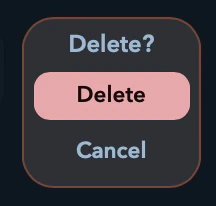
Hover or focus a user palette and click the trash icon. The chip turns into an inline Delete? confirm with Delete and Cancel — no large modal, but it's final, and a toast confirms once it's gone.
If you delete the palette currently driving the selected cell, that cell falls back to Rainbow automatically — nothing goes dark. Built-ins never show a trash icon.
Installing a shared palette
- Open Filament.
- Drag the
.filament-palettefile onto the app window. - A Palette imported toast names it, and it appears in the switcher, ready to use. It persists across restarts.
What if the id is already taken?
A palette's id has to be unique:
- Collision with a built-in — rejected with
palette {id} already ships with Filament. Ask the author to rename it so its id differs from every built-in. - Collision with an existing user palette — rejected with
palette {id} already exists in your library. Filament won't overwrite — delete or rename your existing palette first, or ask for a different id.
Either way you get a Palette import failed toast carrying the message.
What if the file is bad?
- The extension must be exactly
.filament-palette. A.jsonwith the same contents is ignored on drop. - Files over 64 KiB are rejected before reading — a normal palette is well under 10 KiB.
- Corrupt JSON, a wrong
schemaVersion, a bad id, or an invalid color all fail validation. Nothing lands on disk; you get a Palette import failed toast describing the problem.
Sharing a palette
There's no in-app Export button. To share a palette, copy its on-disk palette.json (locations below) somewhere convenient and rename the copy to end in .filament-palette.
On macOS:
cp ~/Library/Application\ Support/Filament/palettes/user/synth-sunset/palette.json \
   ~/Desktop/synth-sunset.filament-palette
That file is what you share; the recipient drags it onto their Filament window.
Where your palettes live on disk
User palettes are stored one folder per palette, each holding a single palette.json:
| Platform | Path |
|---|---|
| macOS | ~/Library/Application Support/Filament/palettes/user/<id>/palette.json |
| Windows | %LOCALAPPDATA%\Filament\palettes\user\<id>\palette.json |
| Linux | ~/.local/share/Filament/palettes/user/<id>/palette.json |
You can hand-edit a palette.json, but the in-app editor is almost always faster — Filament validates each file on load and skips any that fails. If you do edit by hand, the reference card has the exact schema. Built-in palettes ship inside the application bundle, not the user directory.
Designing palettes that look good
A few rules of thumb that hold up in live performance:
- Three to seven colors is the sweet spot. Fewer and the gradient feels stepped; more and individual colors blur together.
- Avoid pure white and pure black unless you want bright flashes or dead patches — LEDs read those literally (full power, off).
- Order matters. Most animations sample in order, so
dark → mid → brightreads as a wave, while colors that hop around read as a flicker. - Keep two palettes per look — a dense, saturated one for peaks and a thinner, desaturated cousin for verses. Switch per cell; the animation stays, only the mood changes.
- Test on the actual fixture, not just the preview. LED color differs from screen color, especially in the deep blue and pink end.
- Built-ins are reference points. Duplicate one you like, shift its hues a little, and you have something that's yours but still reads like Filament.
Reference card for AI agents and frameworks
This section is a compact spec for tools generating palette files programmatically. Everything in it is also covered above in prose.
File format
- File extension:
.filament-palette. - Encoding: UTF-8 JSON, a single top-level object (arrays at the root are rejected).
- Max file size: 64 KiB, enforced before parsing.
- One palette per file. There is no multi-palette pack format.
Schema
{
  "schemaVersion": 1,
  "id": "synth-sunset",
  "label": "Synth Sunset",
  "colors": ["#ff5a2a", "#ff9153", "#ffc564", "#ffe2a8"]
}| Field | Type | Required | Rule |
|---|---|---|---|
schemaVersion | integer | yes | Must equal 1. Any other value is rejected. |
id | string | yes | Matches ^[a-z0-9][a-z0-9-]{0,62}[a-z0-9]$. Length 2–64. ASCII lowercase letters, digits, and hyphens; must start and end with a lowercase letter or digit. |
label | string | yes | Length 1–64 after trim. No control characters. |
colors | string[] | yes | Length 1–256. Each entry matches ^#[0-9a-fA-F]{6}$ (six-digit hex with a leading #). |
Unknown fields are tolerated; they do not affect runtime behavior.
Reserved ids
The fourteen built-in ids (rainbow, warm, cool, forest-floor, ocean-deep, synthwave, monochrome, aurora, ember, candy, noir, heatmap, desert, neon) are reserved. A file whose id collides with any of them is rejected at import.
Validation rules
A file is accepted only if every check passes:
- Extension is
.filament-palette. - File size is at most 64 KiB, checked before reading.
- Body parses as JSON.
- Top-level value is an object, not an array or scalar.
schemaVersion === 1.idis a string matching the id regex, length 2–64.labelis a string, length 1–64 after trim, with no control characters.colorsis an array of length 1–256.- Every
colors[i]matches^#[0-9a-fA-F]{6}$. - On import,
idcollides with neither a built-in nor an existing user palette. A built-in collision fails withpalette {id} already ships with Filament; a user collision fails withpalette {id} already exists in your library. Drag-drop import never overwrites an existing user palette — it simply fails.
Filesystem layout
$DATA_DIR/Filament/palettes/
└── user/
    └── <id>/
        └── palette.json
Per-platform $DATA_DIR:
| Platform | Path |
|---|---|
| macOS | ~/Library/Application Support/Filament/ |
| Windows | %LOCALAPPDATA%\Filament\ |
| Linux | ~/.local/share/Filament/ |
Each user palette is one directory whose name equals the palette's id. It holds exactly one file, palette.json. Extra files in the directory are ignored.
Minimal valid file
{
  "schemaVersion": 1,
  "id": "minimal",
  "label": "Minimal",
  "colors": ["#ffffff"]
}
Save as minimal.filament-palette, drop onto Filament, and the palette appears in the switcher.
Generation guidance
When generating a palette from a description:
- Choose three to seven colors unless the brief calls for more.
- Pick an
idthat is descriptive and unique (kebab-case). Do not reuse a reserved built-in id. - Order colors so adjacent samples are visually adjacent. Animations sample by index; large hops produce flicker.
- Avoid pure
#000000and pure#ffffffunless the brief asks for hard black or white. - Keep
labelshort — the chip truncates aggressively. - Output raw JSON. Do not wrap it in Markdown fences or include comments; JSON does not allow comments and the file would be rejected.
Custom Animations
Install community animations or write your own — Filament's .filament-animation bundle format, the WGSL phase-and-beat runtime contract, and live hot-reload.
Video Clips
Browse your media folders, drag video files onto the grid, and tune each clip's transport, trim, play mode, and fit.